
Situatie
To disable the Windows Share Drag Tray UI on Windows 11, follow these steps:
Solutie
1. Open Start
2. Search for regedit and click the top result to open the Registry
3. Navigate to the following path:
HKEY_LOCAL_MACHINE\SYSTEM\ControlSet001\Control\FeatureManagement\Overrides
4. Right-click the Overrides key, select the New menu, and select the Key option.
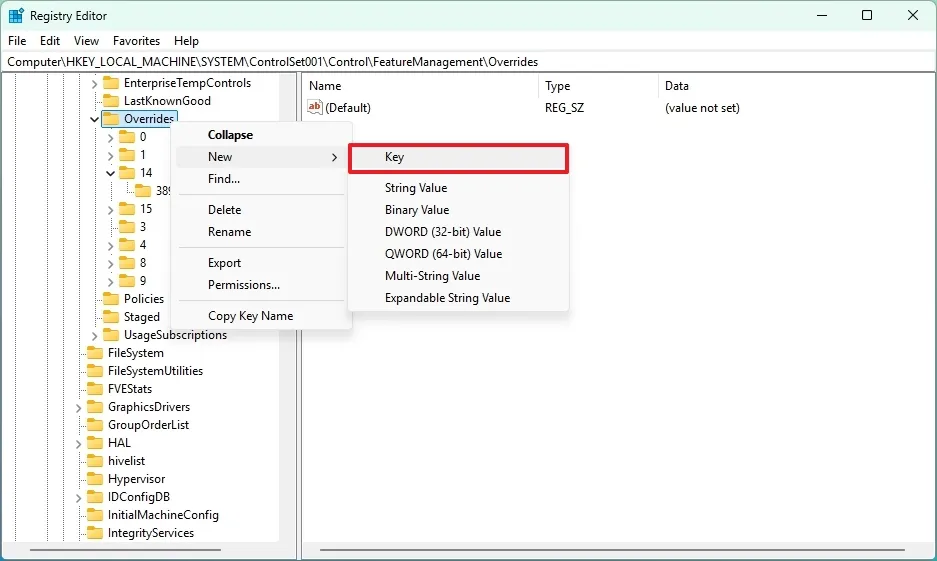
5. Confirm 14 as the name of the key and press Enter
6. Right-click the newly created key, select the New menu, and select the Key option.
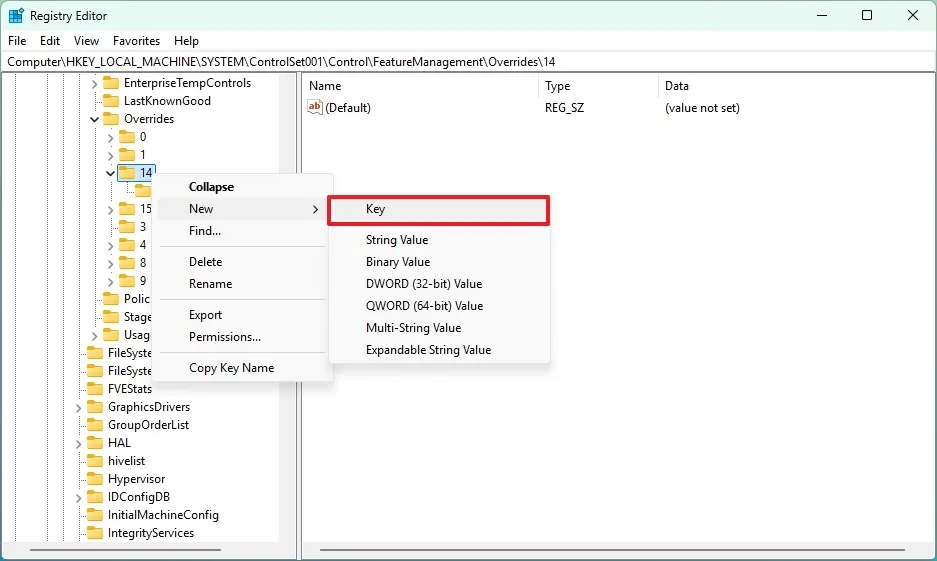
7. Name the key 3895955085 and press Enter.
8. Right-click the newly created key, select the New menu, and select the “DWORD (32-bit) Value” option.

9. Confirm the EnabledState name for the entry and press Enter.
10. Right-click the newly created key, select the New menu, and select the “DWORD (32-bit) Value” option.
11. Confirm the EnabledStateOptions name for the entry and press Enter.
12. Double-click the EnabledState entry and change the value from 0 to 1.

13. Click the OK button
14. Double-click the EnabledStateOptions entry and ensure the value is 0
15. Click the OK button
16. Restart the computer.
Once you complete the steps, the Drag Tray part of the Windows Share experience will no longer be available on Windows 11.
Leave A Comment?