
Situatie
To enable the new pause settings calendar control on Windows 11, install build 26300.8170 manually, and then follow these steps:
Solutie
2. Download the ViveTool-vx.x.x.zip file to enable the new pause update settings
3. Double-click the zip folder to open it with File Explorer
4. Click the Extract all button
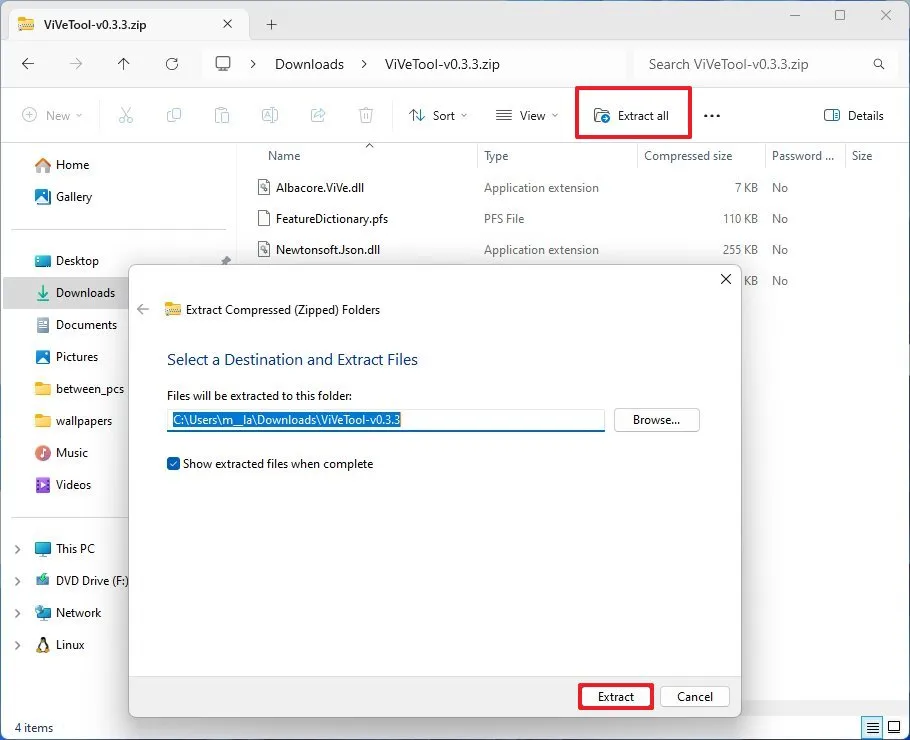
5. Click the Extract button
6. Copy the path to the folder
7. Open Start
8. Search for Command Prompt, right-click the top result, and select the Run as administrator option
9. Type the following command to navigate to the ViveTool folder and press Enter:
cd c:\folder\path\ViveTool-v0.x.x
In the command, remember to change the path to the folder with your path.
10. Type the following command to enable the pause updates setting on the Windows Update page and press Enter:
vivetool /enable /id:61410885
11. Restart the computer.
Once you complete the steps, the “Pause for 1 week” button is replaced by a calendar control, allowing you to set a specific date for when updates will resume. This effectively allows for much longer pause periods than the current preset limits.
Leave A Comment?