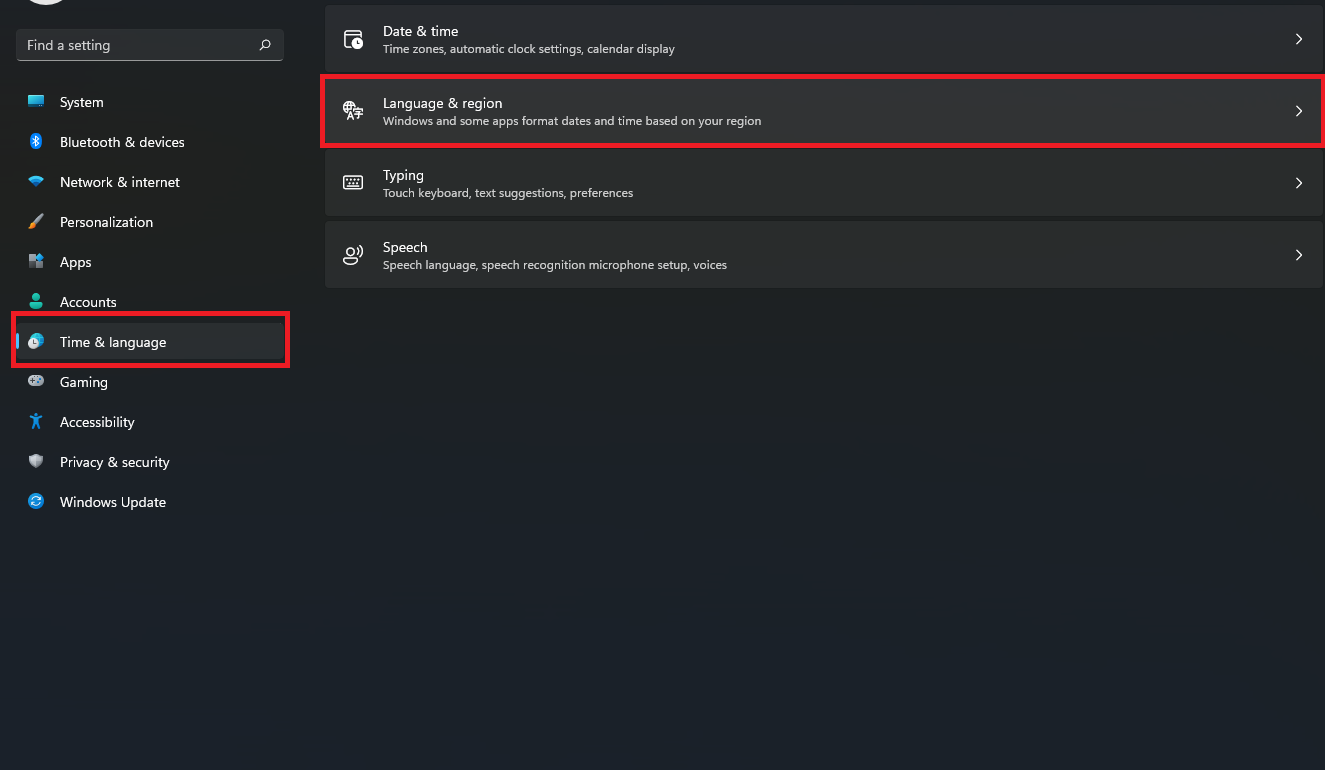
Schimbarea regiunii in Windows 11 Data 18/03/2022 Autor catalin nechita Categorie OS - Windows 2 433 Configurare noua (How To) Situatie Solutie 1.Se da click dreapta pe desktop si se alege Personalize; 2.Se alege tabul Time & language si se alege optiunea Language & region; 3.Se alege regiunea dorita din optiunea Country or region. Tip solutiePermanent Voteaza Up Down (15 din 28 persoane apreciaza acest articol) ShareTweetShare Despre Autor catalin nechita Solutii Asemanatoare Stop using Rufus to burn ISOs, these 2 tools for Windows and Linux are better 1 Tuxedo OS install guide 1 Spyware-ul pe înțelesul tuturor: cum îl eviți? 3 How to enable hidden CPU performance boost mode on Windows 11 5 Cum remediem: you can’t Sign in with this account error In Windows 11 3 Remediere: ASSIGN_DRIVE_LETTERS_FAILED 2 Leave A Comment? × Cancel Reply Save my name, email, and website in this browser for the next time I comment. 3 − = zero
Leave A Comment?
