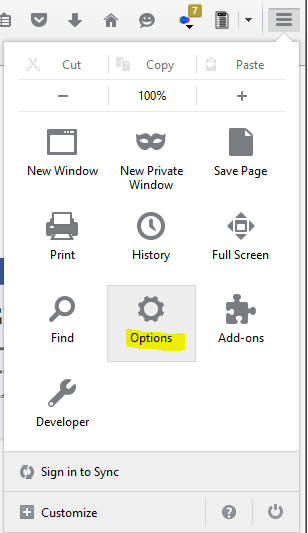
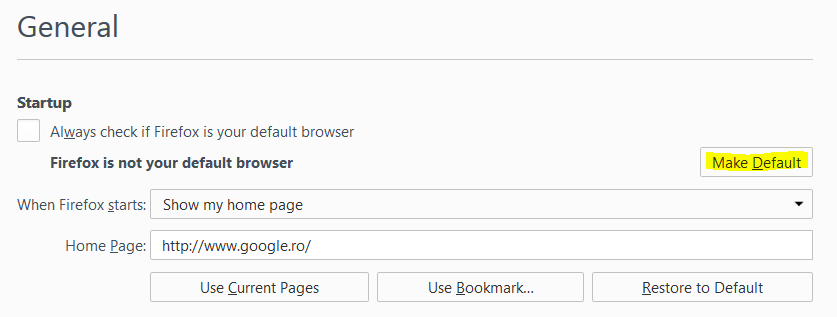
Setare Firefox ca browser principal Data 14/07/2015 Autor Sorin O Categorie Configurare browser, Aplicatii specifice, Stații de lucru -15 4291 Configurare noua (How To) SituatieSetare Firefox ca browser principal Solutie Pasi de urmat Se navigheaza in “Options”: In tab-ul “General” se alege ” Make Default” : Tip solutiePermanent Voteaza Up Down (38 din 91 persoane apreciaza acest articol) ShareTweetShare Despre Autor Sorin O Solutii Asemanatoare Activarea multi-sesiunilor pentru Remote Desktop pe Windows Server 4 Cum actualizezi toate programele instalate in Windows cu o singura comanda 4 Cum muti toate programele pe un PC nou cu winget export si import -1 Cum dezinstalezi bloatware-ul dintr-un Windows 11 nou cu winget, fara utilitare externe 6 Sistemul de operare optimizat pentru Edge Computing și Self-Healing -2 Bara de instrumente Microsoft Word a fost gri sau nu răspunde 3 Leave A Comment? × Cancel Reply Save my name, email, and website in this browser for the next time I comment. nine − four =

Leave A Comment?