
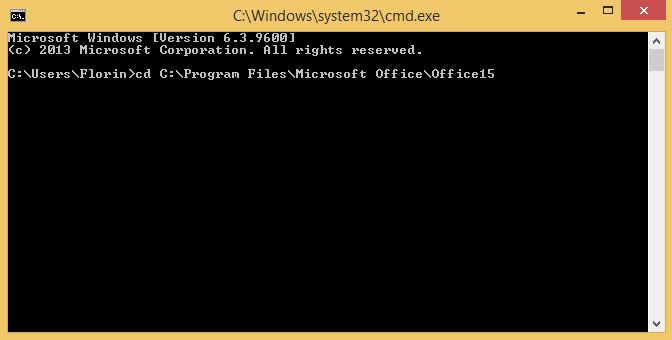
Stergere cheie de activare Office 2013 Data 10/05/2016 Autor Florin Ghe Categorie OS - Windows, Aplicații 4 1293 Configurare noua (How To) SituatieSe doreste stergerea product key-ului pentru Office 2013 Solutie Pasi de urmat Se introduce urmatoarea comanda in command prompt : cd C:Program FilesMicrosoft OfficeOffice15 Se tasteaza comanda : cscript ospp.vbs /unpkey:value unde value reprezinta product key-ul activ al Office-ului Tip solutiePermanent Voteaza Up Down (28 din 51 persoane apreciaza acest articol) ShareTweetShare Despre Autor Florin Ghe Solutii Asemanatoare What is OpenClaw? Reviving a classic through open technology 3 How to install and configure Gentoo Linux -2 How to create a Windows to go with Rufus to run Windows 11 from USB 1 Cum îți faci un raport complet al PC-ului cu PowerShell 8 Cum vezi toate procesele care pornesc automat cu Windows 3 Cum se instalează sistemul de gestionare a fotografiilor Lychee pe Debian 12 5 Leave A Comment? × Cancel Reply Save my name, email, and website in this browser for the next time I comment. × three = twenty seven
Leave A Comment?