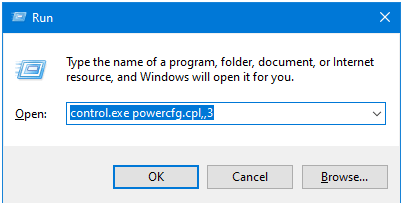
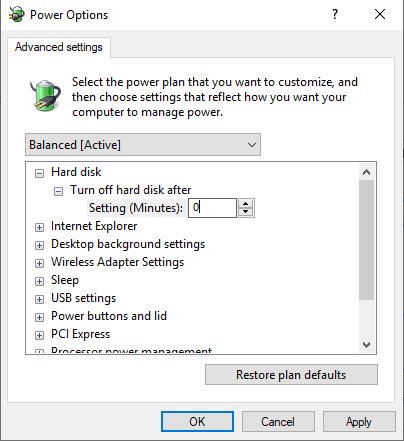
Cum sa previi ca Windows-ul sa iti opreasca un HDD cand e in “Idle” Data 12/06/2020 Autor Gabriel Burtea Categorie OS - Windows, Aplicații, Stații de lucru, Configurare Sistem de operare, Depanare -13 976 Configurare noua (How To) SituatieDoresti ca HDD-ul tau sa nu mai fie oprit de catre Windows cand nu este utilizat. Solutie Apasam tasta Windows + R pentru a deschide fereastra “Run” Aici tastam: control.exe powercfg.cpl,,3 Dam expand la “Hard Disk” si la “Turn off hard disk after” si schimbam valoarea in 0 Tastam OK Tip solutiePermanent Voteaza Up Down (21 din 55 persoane apreciaza acest articol) ShareTweetShare Despre Autor Gabriel Burtea Solutii Asemanatoare Shortcut catre Wallet pe lockscreen pentru OnePlus (OxygenOS) 3 Cum folosesti “Circle to Search” pe OnePlus (Oxygen OS 15) 2 Cum decupezi imagini in forme creative direct in Figma 1 How to fix Hypervisor Error in Windows 10/11 by Checking Drive for File System Errors 2 How to fix Hypervisor Error in Windows 10/11 by restarting Hyper-V Services 1 How to fix Hypervisor Error in Windows 10/11 by running Windows Memory Diagnostic Tool 0 Leave A Comment? × Cancel Reply Save my name, email, and website in this browser for the next time I comment. 5 − = 1
Leave A Comment?