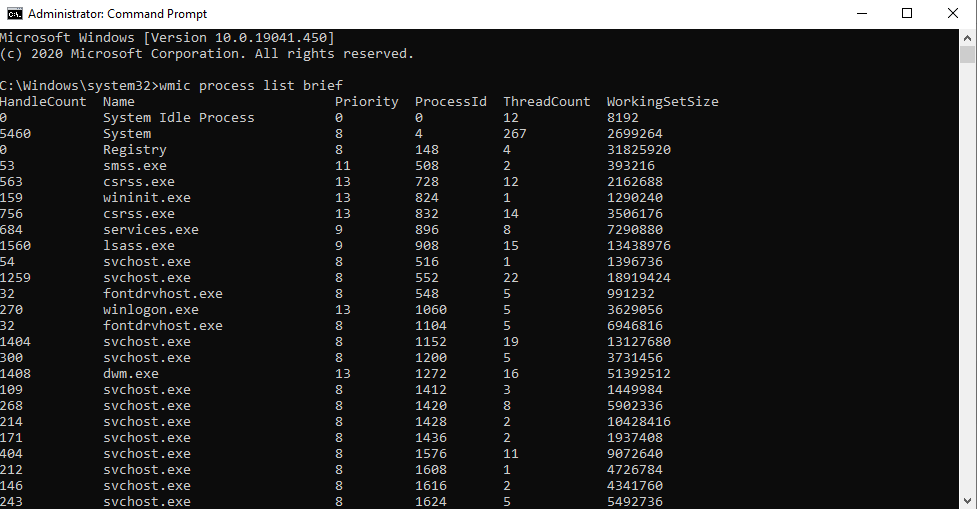
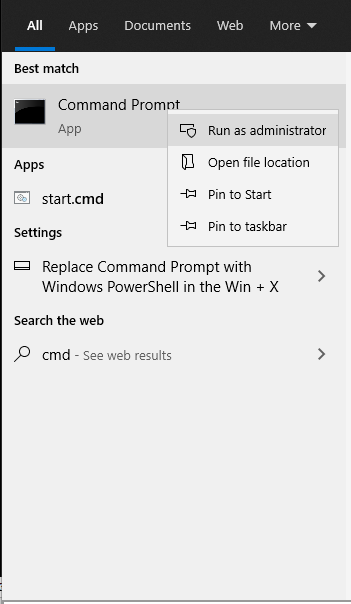
Cum afisam procesele care ruleaza cu ajutorul WMIC Data 23/08/2020 Autor Costinel Cirstea Categorie OS - Windows, Soluții 1 510 Configurare noua (How To) SituatieDorim sa aflam ce procese ruleaza in sistemul de operare. Solutie Pasi de urmat Intram in start si scriem cmd, apoi il rulam cu drepturi de administrator: Rulam comanda: wmic process list brief Tip solutiePermanent Voteaza Up Down (15 din 30 persoane apreciaza acest articol) ShareTweetShare Despre Autor Costinel Cirstea Solutii Asemanatoare How to use System Restore on Windows 10 and Windows 11 4 Cum se instalează Fail2ban pe Rocky Linux 10, 9 și 8? 2 Cum se dezactiveaza SELinux pe Rocky Linux 10, 9 si 8? 4 Cum se instaleaza Remi RPM pe Rocky Linux 10, 9 si 8? 4 Cum rezolvi problema în care calculatorul pornește direct în BIOS 1 Cum rezolvi problema în care Windows nu mai reține poziția iconițelor de pe Desktop 3 Leave A Comment? × Cancel Reply Save my name, email, and website in this browser for the next time I comment. 7 + 4 =
Leave A Comment?