
Follow Us

Soluții pentru problemele tale IT

Home /Soluții /How to delete your Microsoft account.

How to delete your Microsoft account.

  • Data 21/03/2022
  • Autor Alexandru Oancea
  • Categorie Soluții
  • -4
  • 794
Configurare noua (How To)

Situatie

One day you wake up and want to delete your Microsoft account for one reason or another.

Solutie

First you have to sign into your account.

Next visit the address https://account.live.com/closeaccount.aspx
You will be welcomed with this page.

Read the additional information and follow the recommendations if needed to make sure nothing goes to waste.Press next when you are ready.

The next window will ask you to check all the boxes shown and select a reason for wanting to close the account.Make sure to read and be aware of the consequences of closing the Microsoft account and to not do it on a whim just to regret it later.
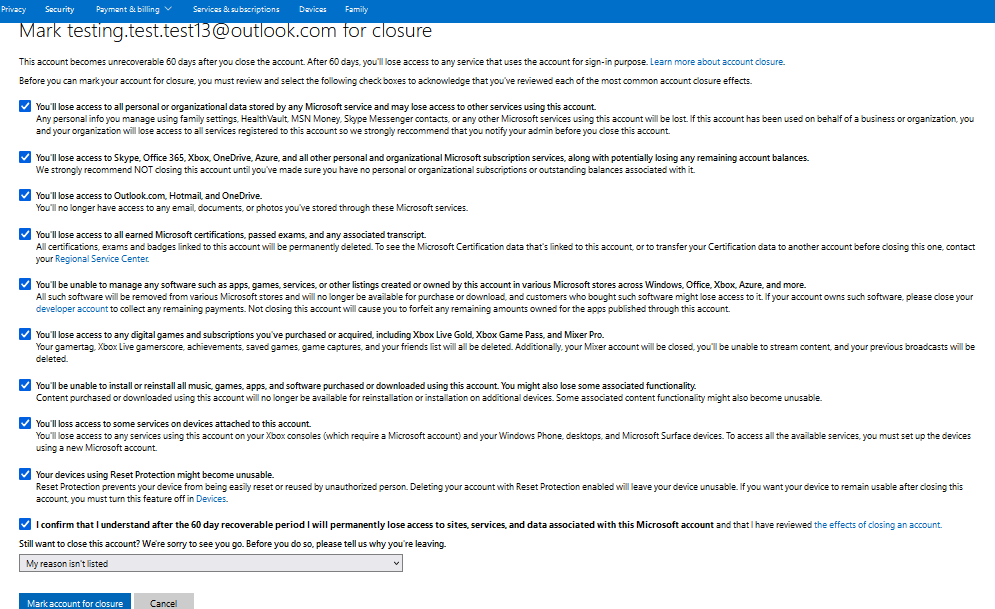
  • Finally,click on Mark account for closure.
  • Next window will take you here.


You can see the date of your account’s deletion and you can attempt to restore it during that period.

Tip solutie

Permanent
Etichetare: Closehow toMicrosoft account

Voteaza

Up Down
(21 din 46 persoane apreciaza acest articol)
Share
Tweet
Share

Despre Autor

Alexandru Oancea

Solutii Asemanatoare

  • Cum configurezi DKIM pentru un domeniu în Microsoft 365 1
  • Cum verifici și repari sincronizarea SharePoint în clientul OneDrive 0
  • Identificarea și blocarea automată a conturilor inactive în Active Directory 3
  • Certificat SSL valid, dar site-ul afiseaza avertismente 2
  • Userul nu mai are acces prin SSH 3
  • Time sync nu functioneaza 2

31669

Soluții Disponibile

0 Articole

In ultima saptamana

Cele mai recente soluții

  • Cum configurezi DKIM pentru un domeniu în Microsoft 365
    • 7
    • 11 hours ago
  • Cum verifici și repari sincronizarea SharePoint în clientul OneDrive
    • 6
    • 10/06/2026
  • Identificarea și blocarea automată a conturilor inactive în Active Directory
    • 23
    • 2 days ago
  • Certificat SSL valid, dar site-ul afiseaza avertismente
    • 22
    • 3 days ago
  • Userul nu mai are acces prin SSH
    • 22
    • 08/06/2026
© Askit.ro, 2014 - 2026. All rights reserved. Done by Class IT
Share
Tweet
Share