
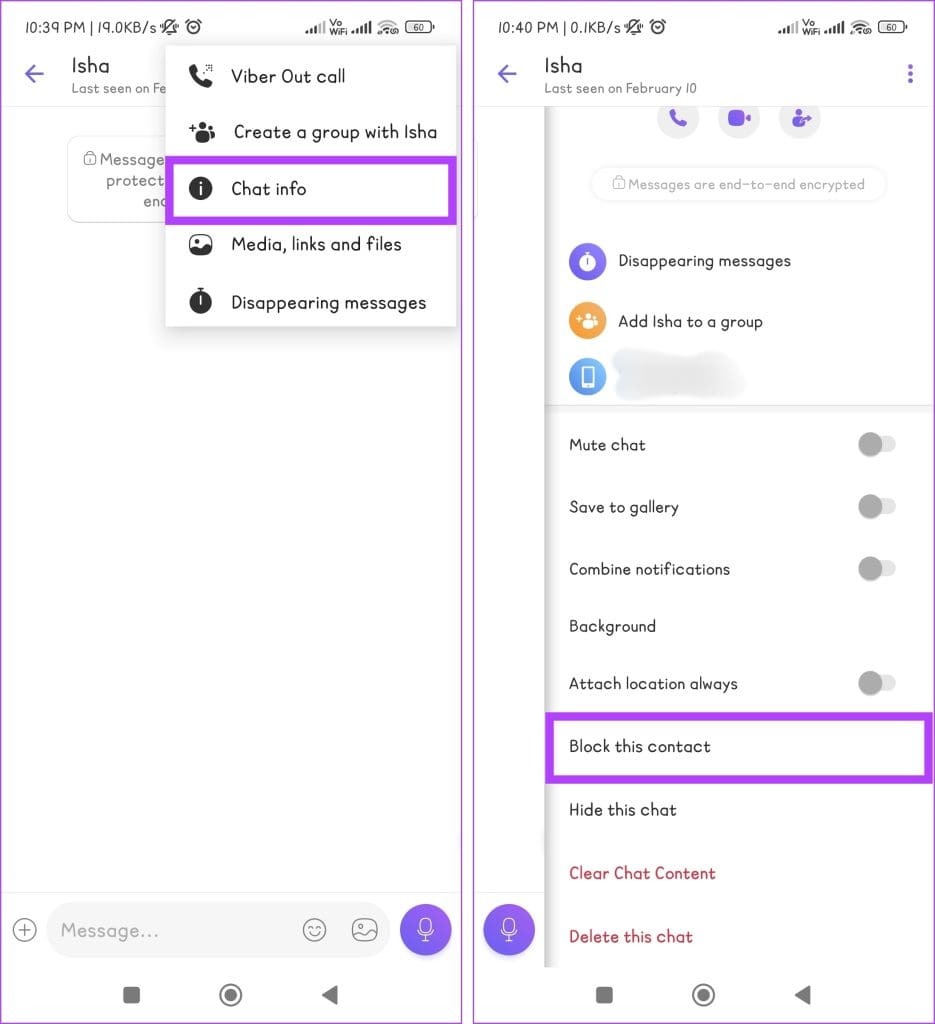
How to block or unblock someone on the Viber App Data 24/02/2024 Autor Marius Nichita Categorie Soluții 2 250 Configurare noua (How To) Situatie Solutie Pasi de urmat Launch the Rakuten Viber app on your Android or iOS device. Ensure to be on the Chat tab. Locate the chat with the person you want to block and open it. Press the three-dots icon. Select Chat info. Scroll down and tap Block this contact. Tip solutiePermanent Voteaza Up Down (16 din 30 persoane apreciaza acest articol) ShareTweetShare Despre Autor Marius Nichita Solutii Asemanatoare Stocarea cheilor BitLocker în Active Directory 5 Service Host: Network Service cu utilizare mare de rețea 4 Remediere eroare: You can’t sign in with this account în Windows 11 4 How to turn an old Android phone into a media server 5 5 Gmail features you can turn off 3 How to disable BitLocker on Windows 11 using from PowerShell 4 Leave A Comment? × Cancel Reply Save my name, email, and website in this browser for the next time I comment. × eight = 16
Leave A Comment?