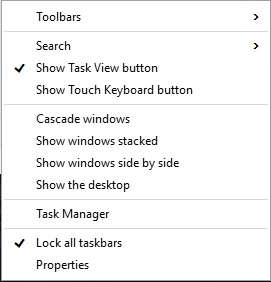
Dezactivare bara de cautare windows 10 Data 22/06/2015 Autor Laurentiu G Categorie OS - Windows, Stații de lucru, Configurare Sistem de operare 7 5835 Configurare noua (How To) SituatieDezactivare bara de cautare windows 10 Backup Solutie Pasi de urmat Apasam click dreapta pe bara de start Selectam meniul “Search”(Cautare) si apoi selectam “Disable”(Dezactivat) Tip solutiePermanent Voteaza Up Down (65 din 122 persoane apreciaza acest articol) ShareTweetShare Despre Autor Laurentiu G Solutii Asemanatoare Cum urmărești doar o parte dintr-o fereastră cu PowerToys Crop And Lock 0 Windows 11 – previzualizarea fișierelor PDF nu funcționează în File Explorer 0 How to verify Windows 11 ISO file authenticity using PowerShell 1 Here are some other ways to use the power button on a Samsung Galaxy phone 1 Sistem de supraveghere video Dahua folosind PC în loc de NVR 0 Cum repari rapid o imagine corruptă de Windows când comanda sfc /scannow eșuează -3 Leave A Comment? × Cancel Reply Save my name, email, and website in this browser for the next time I comment. + 5 = fourteen
Leave A Comment?

