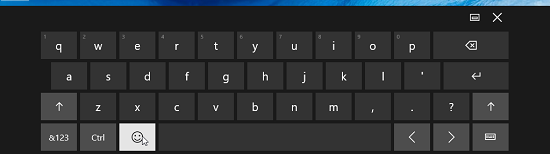
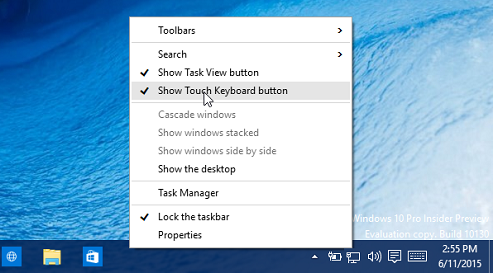
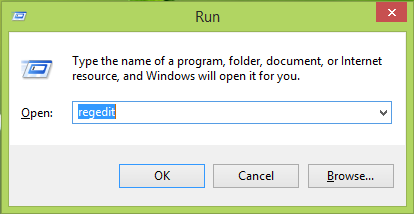
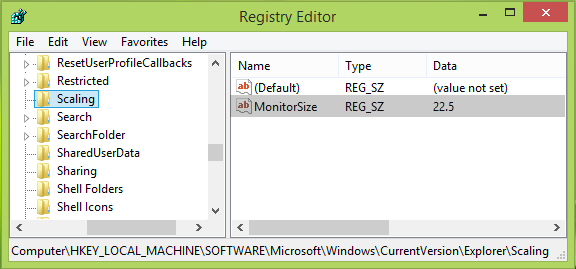
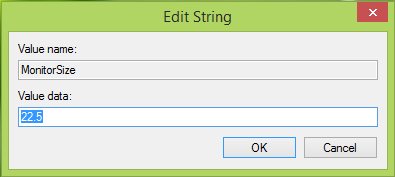
Touch keyboard not working in Windows 10 / 8 Data 15/07/2015 Autor Adrian Tu. Categorie Depanare, OS - Windows, Stații de lucru -7 1399 Configurare noua (How To) SituatieLansezi tastatura de ecran pentru touch si constati ca aceasta nu functioneaza. Solutie Pasi de urmat Click dreapta pe bara start si alegi ” Show Touch Keyboard button ” Apesi tasta de win key + R si scrii “regedit” pentru a accesa registrii: Navighezi catre : HKEY_LOCAL_MACHINESOFTWAREMicrosoftWindowsCurrentVersionExplorerScaling Se alege monitor size si se modifica valoarea la 22,5. Click Ok si se inchide fereastra. Tip solutiePermanent Voteaza Up Down (22 din 51 persoane apreciaza acest articol) ShareTweetShare Despre Autor Adrian Tu. Solutii Asemanatoare Stocarea cheilor BitLocker în Active Directory 5 Service Host: Network Service cu utilizare mare de rețea 4 Remediere eroare: You can’t sign in with this account în Windows 11 4 How to install Inkscape 1.4 in Ubuntu 24.04? -1 How to install GIMP on Ubuntu 24.04? 3 How to install Mattermost on Ubuntu 24.04? 2 Leave A Comment? × Cancel Reply Save my name, email, and website in this browser for the next time I comment. 4 × 6 =
Leave A Comment?