
Situatie
To disable your PC’s touchscreen through the Registry Editor, follow these steps:
Solutie
1. Open Start
2. Search for regedit and click the top result to open the Registry
3. Open the following path: HKEY_CURRENT_USER\Software\Microsoft\Wisp\Touch
4. Right-click the Touch folder, select New, and choose the “DWORD (32-bit) Value” option.

5. Confirm the ‘TouchGate’ name (no”) and press Enter
6. Right-click the newly created key and choose the Modify option
7. Confirm the value is set to 0
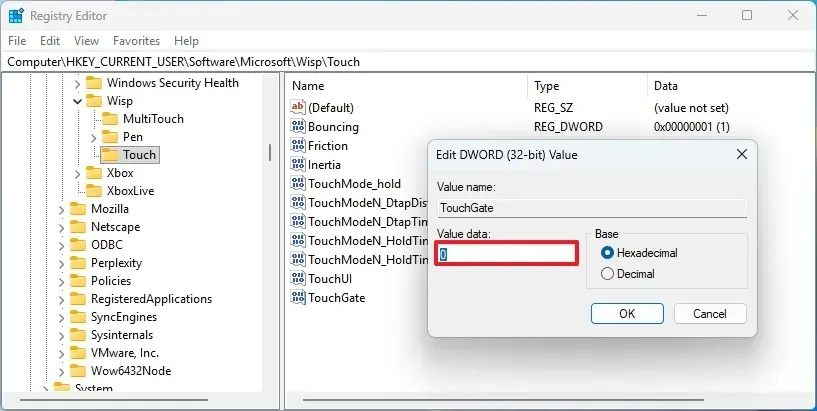
8. Click the OK button
9. Restart the computer.
10. After you complete the steps, the Registry key will disable the touchscreen on Windows 11. If you want the touchscreen experience re-enabled, follow the same instructions, but at step 7, set the value to 1.
Leave A Comment?