
Situatie
Disconnect any Logitech gear connected to G HUB.If G HUB won’t open, you may be able to fix it by closing any running G HUB processes and then restarting the app. First, unplug any external Logitech webcams or other gear you use with G HUB.
Solutie
Pasi de urmat
Open Appwiz.cpl.You may be able to fix G HUB not opening using the “Change” option instead of “Uninstall” in Control Panel. To get started, type appwiz.cpl into the Windows Search bar and press Enter.
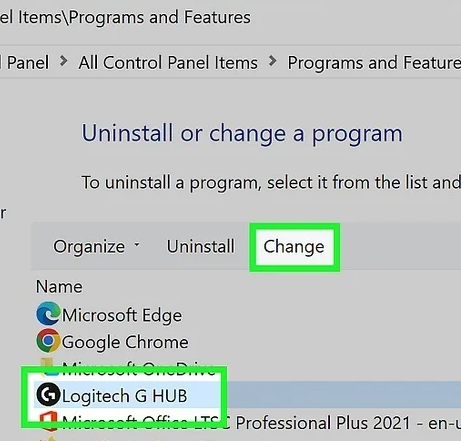
Select “Logitech G HUB” and click the Change button.The button is above the list of applications.
- If prompted, click Yes to confirm.
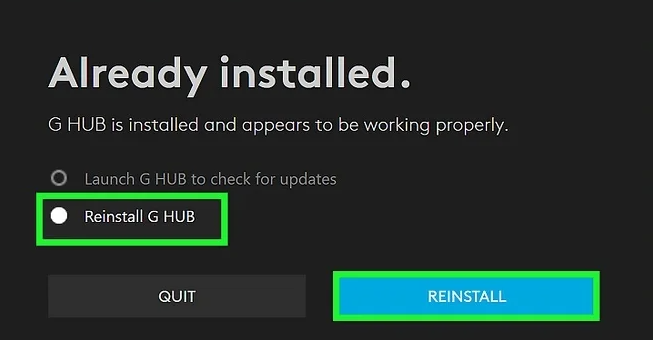
Select “Reinstall G HUB” and click REINSTALL. You’ll be asked if you want to keep your settings.
Check the box next to “Transfer my current settings” and click REINSTALL.This reinstalls G HUB without losing any of your settings. Hopefully, G Hub will open normally after this.
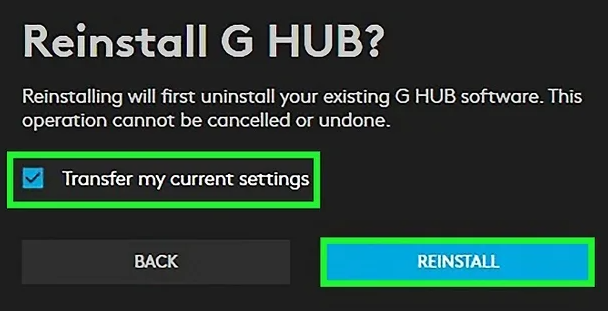
This reinstalls G HUB without losing any of your settings. Hopefully, G Hub will open normally after this.
Leave A Comment?