
Situatie
Disconnect any Logitech gear connected to G HUB. If G HUB won’t open, you may be able to fix it by closing any running G HUB processes and then restarting the app. First, unplug any external Logitech webcams or other gear you use with G HUB.
Solutie
Open the Registry Editor.To do this, type regedit into the Windows Search bar and press Enter. Now you’ll just need to remove a registry key.
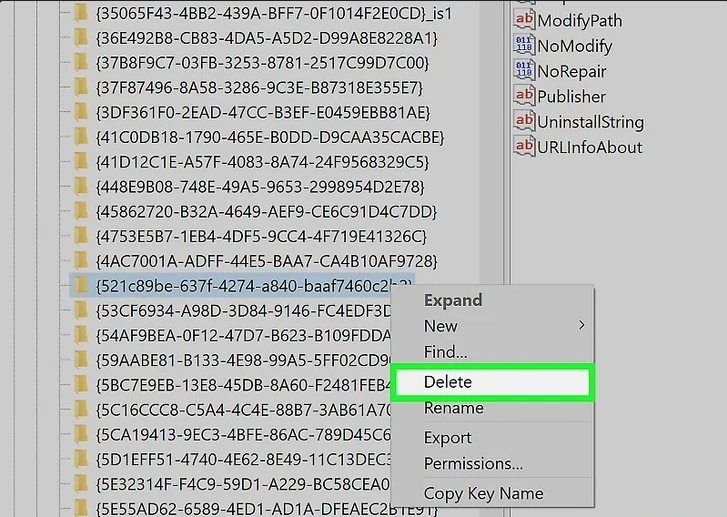
Delete the LGHUB registry key.Here’s how:
- Double-click HKEY_LOCAL_MACHINE.
- Double-click Software.
- Double-click Microsoft.
- Double-click Windows.
- Double-click CurrentVersion.
- Double-click Uninstall.
- Right-click the key called {521c89be-637f-4274-a840-baaf7460c2b2} and select Delete.
- Close the Registry Editor.
Reboot your PC and reinstall G HUB.
Leave A Comment?