
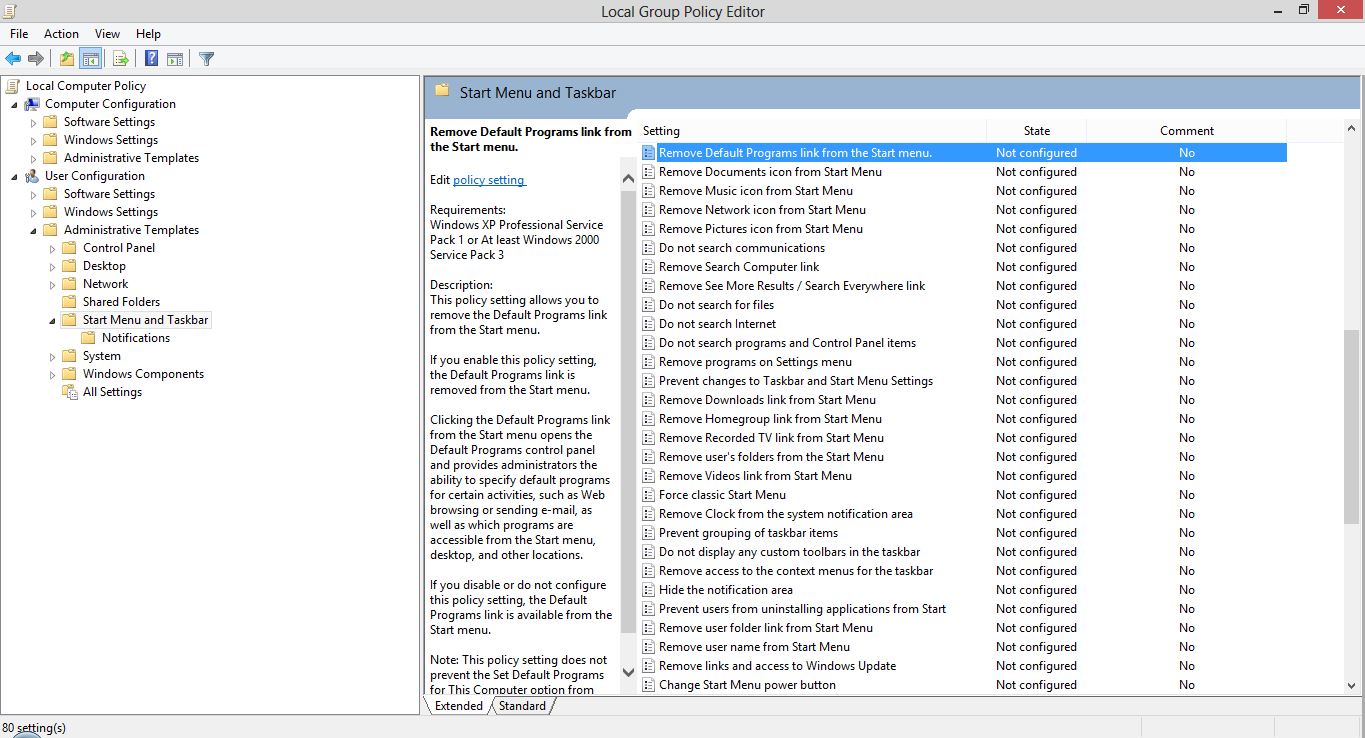
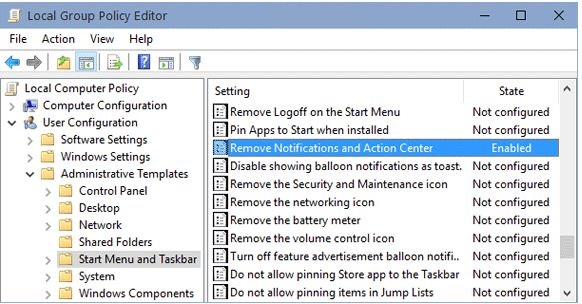
Cum dezactivam Action Center pe Windows 10 Data 14/09/2015 Autor Cristian V Categorie Configurare OS, OS - Windows, Stații de lucru 5 1335 Rezolvare problema (Fix IT) SituatieDorim dezactivarea Action Center Solutie Pasi de urmat Apasam Win+R, scriem gpedit.msc Accesam User Configuration -> Administrative Templates -> Start Menu and Taskbar Dam dublu click pe Remove Notifications and Action Center si il setam ca enable Restartam sistemul de operare Tip solutiePermanent Voteaza Up Down (31 din 57 persoane apreciaza acest articol) ShareTweetShare Despre Autor Cristian V Solutii Asemanatoare Arduino Fingerprint Sensor 4 Arduino Air Quality Monitoring System 3 Shortcut catre Wallet pe lockscreen pentru OnePlus (OxygenOS) 3 Cum folosesti “Circle to Search” pe OnePlus (Oxygen OS 15) 1 Cum decupezi imagini in forme creative direct in Figma 1 How to fix high CPU usage in Firefox / Chrome 2 Leave A Comment? × Cancel Reply Save my name, email, and website in this browser for the next time I comment. two + = three
Leave A Comment?