
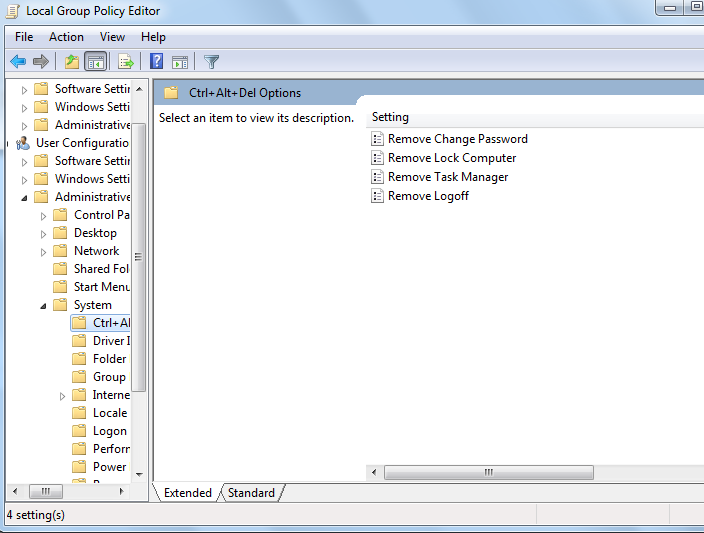
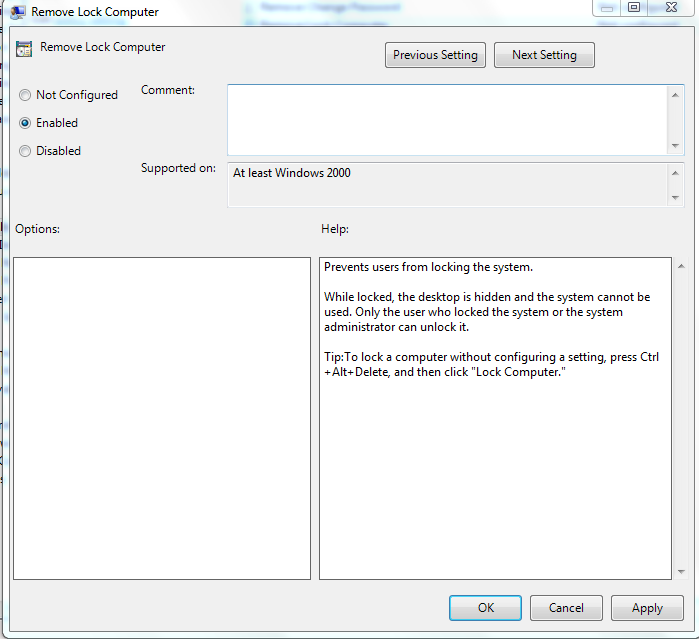
Cum eliminam optiunea Lock din ecranul CTRL+ALT+DEL Data 14/04/2016 Autor Cristian V Categorie OS - Windows -19 1416 Rezolvare problema (Fix IT) SituatieDorim eliminarea acestei optiuni. Solutie Pasi de urmat Apasam WIN+R si scriem gpedit.msc Accesam User ConfigurationAdministrative TemplatesSystemCtrl+Alt+Del Options Dam dublu click pe Remove Lock Computer si il setam ca enabled Restartam sistemul de operare. Tip solutiePermanent Voteaza Up Down (16 din 51 persoane apreciaza acest articol) ShareTweetShare Despre Autor Cristian V Solutii Asemanatoare Funcția UNIQUE nu funcționează în Excel 2 Outlook nu funcționează cu VPN pe PC Windows 2 Bara de volum in Windows 11 apare incontinuu 4 Kubuntu installation guide -1 Cum resetam consumul de date din Windows 1 How to enable new CPU boost feature on Windows 11 -1 Leave A Comment? × Cancel Reply Save my name, email, and website in this browser for the next time I comment. three × two =
Leave A Comment?