
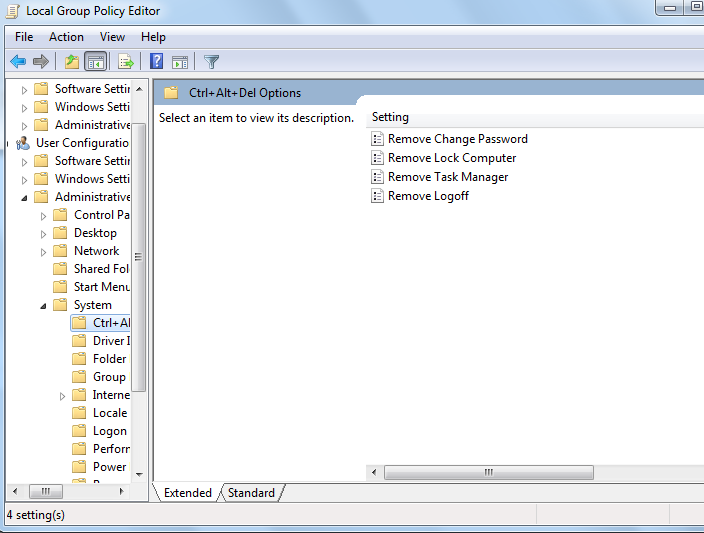
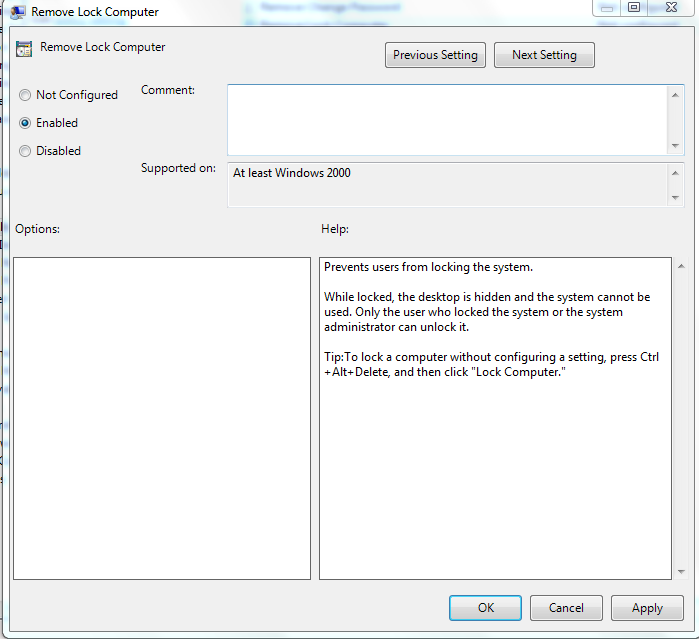
Cum eliminam optiunea Lock din ecranul CTRL+ALT+DEL Data 14/04/2016 Autor Cristian V Categorie OS - Windows -19 1429 Rezolvare problema (Fix IT) SituatieDorim eliminarea acestei optiuni. Solutie Pasi de urmat Apasam WIN+R si scriem gpedit.msc Accesam User ConfigurationAdministrative TemplatesSystemCtrl+Alt+Del Options Dam dublu click pe Remove Lock Computer si il setam ca enabled Restartam sistemul de operare. Tip solutiePermanent Voteaza Up Down (16 din 51 persoane apreciaza acest articol) ShareTweetShare Despre Autor Cristian V Solutii Asemanatoare Shortcut close the current tab in Google Chrome v2 2 Shortcut maximize the current window of Google Chrome 2 Shortcut accesare meniu Settings din Google Chrome 1 Shortcut quit Chrome 2 Activarea multi-sesiunilor pentru Remote Desktop pe Windows Server 2 Sistemul de operare optimizat pentru Edge Computing și Self-Healing 0 Leave A Comment? × Cancel Reply Save my name, email, and website in this browser for the next time I comment. 8 − = 6
Leave A Comment?