
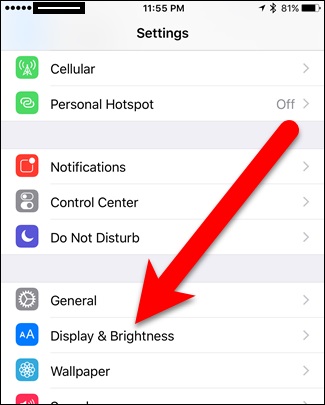
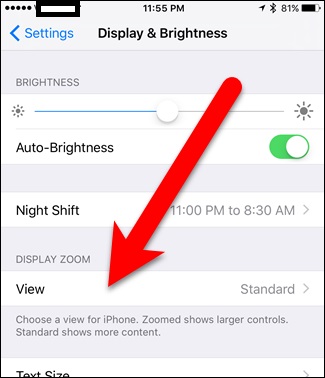
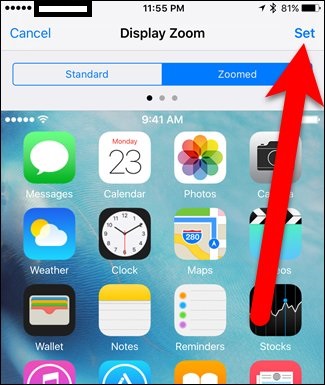
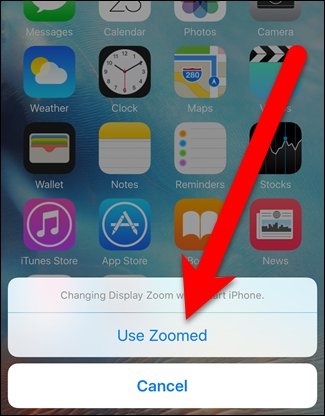
Cum sa maresti dimensiunea textului si iconitelor in iPhone. Data 11/07/2016 Autor Valentin G Categorie iPhone, Mobile, Setari configurare IOS 7 2222 Configurare noua (How To) SituatieCum sa maresti dimensiunea textului si iconitelor in iPhone. Solutie Pasi de urmat Se intra in “Settings” si “Display & Brightness”. Se da click pe “View”. Se alege optiunea “Zoomed” din partea dreapta sus. Se da click pe “Set” in partea dreapta sus. In fereastra de confirmare se da click pe “Use Zoomed”. Tip solutiePermanent Etichetare: askitaskit.roCum sa maresti dimensiunea textului si iconitelor in iPhoneDisplay & Brightnessiconiteiphonemarire dimensiune textUse Zoomed Voteaza Up Down (41 din 75 persoane apreciaza acest articol) ShareTweetShare Despre Autor Valentin G Solutii Asemanatoare Cum folosesti File Dock: Transfer rapid intre aplicatii (Drag & Drop) -1 Cum folosesti noile “Shortcut App Icons” pe Oxygen OS 16 3 Cum sa ai “AirDrop” pe OnePlus/Oppo: Transfer intre iPhone, PC si Oxygen OS 16 3 Castile se aud incet? Solutie pentru Oxygen OS 16 0 Cum activezi anuntarea vocala a apelantului pe Samsung 5 Artefacte grafice (ale texturilor) in aplicatii 2D sau 3D pe terminale iOS/Android (ARM) 2 Leave A Comment? × Cancel Reply Save my name, email, and website in this browser for the next time I comment. + four = 9
Leave A Comment?