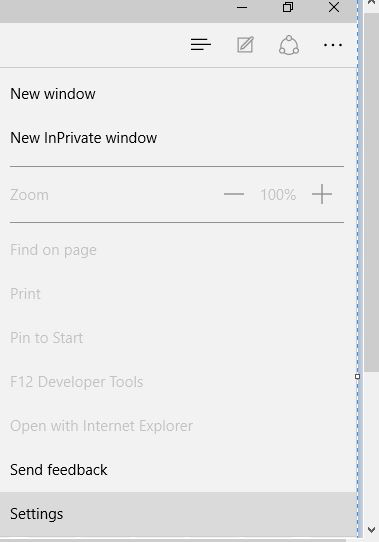
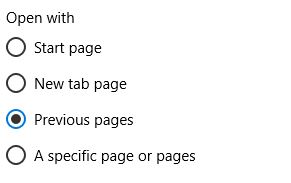
Deschide Microsoft Edge cu paginile accesate la ultima sesiune Data 11/11/2016 Autor Stefan S Categorie Aplicații -6 1318 Configurare noua (How To) SituatieDorim sa deschidem Microsoft Edge cu paginile accesate la ultima sesiune. Solutie Accesam Meniu – Settings Navigam pana la optiunea Open With si alegem optiunea 3 (Previous pages) Tip solutiePermanent Etichetare: askit.roaskitDeschide Microsoft Edge cu paginile accesate la ultima sesiunemicrosoft edge Voteaza Up Down (26 din 56 persoane apreciaza acest articol) ShareTweetShare Despre Autor Stefan S Solutii Asemanatoare Arduino Soil Moisture Sensor 4 Arduino Fingerprint Sensor 2 How to fix high CPU usage in Firefox / Chrome -1 Here’s the right way to use Microsoft Word on your phone 4 How to free up disk space on your Mac 2 How to extract audio from a video file on iPhone 7 Leave A Comment? × Cancel Reply Save my name, email, and website in this browser for the next time I comment. × five = forty five
Leave A Comment?
