
Follow Us

Soluții pentru problemele tale IT

Home /Aplicații/E-mail/Add account da eroare RunDll32 in Outlook 2013

Add account da eroare RunDll32 in Outlook 2013

  • Data 10/04/2017
  • Autor Alexandru Vs.
  • Categorie E-mail
  • -9
  • 1188
Rezolvare problema (Fix IT)

Situatie

Incercam sa adaugam in Outlook 2013 un cont de tip Office 365 Online si primim eroarea:

“Windows host process (Rundll32) has stopped working

A problem caused the program to stop working correctly.  Windows will close the program and notify you if a solution is available.”

Simptome

“Windows host process (Rundll32) has stopped working

A problem caused the program to stop working correctly.  Windows will close the program and notify you if a solution is available.”

Backup

Nu necesita

Solutie

Pasi de urmat

Deschidem outlook si accesam meniul “File”

Alegem submeniul “Options”

Alegem tab-ul Advanced si bifam casuta din dreptul optiunii “Disable hardware graphics acceleration”
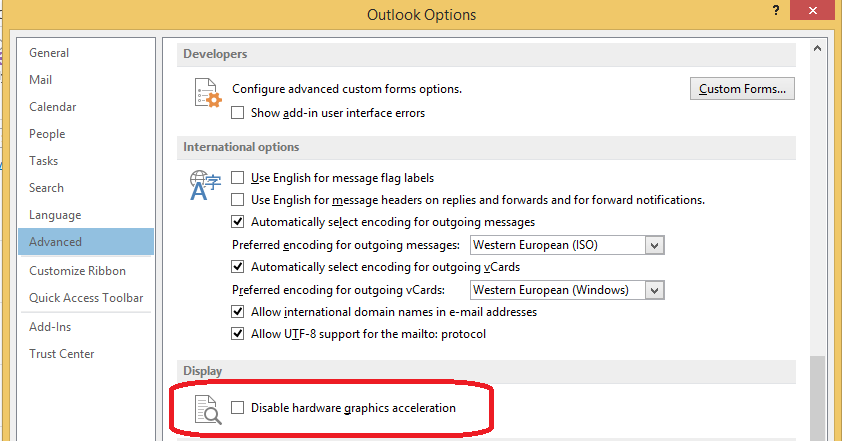
Adaugam contul de email

Tip solutie

Permanent
Etichetare: Add account da eroare RunDll32 in Outlook 2013askitaskit.rodisable hardware graphics accelerationoutlook 2013RunDll32Windows host process

Voteaza

Up Down
(27 din 62 persoane apreciaza acest articol)
Share
Tweet
Share

Despre Autor

Alexandru Vs.

Solutii Asemanatoare

  • Remedierea erorii 500 (Internal Server Error) în Dropbox 8
  • Gestionarea funcției Meeting Insights și a conținutului sugerat 0
  • Cum se instalează PHP 5.6 și 7.0 – 8.4 cu PHP-FPM și modul FastCGI pentru ISPConfig 3.2 cu apt pe Debian 11 până la 12 7
  • 5 Gmail features you can turn off -3
  • 5 Outlook tools that save me time every single day 1
  • 6 ways to speed up email management in Outlook 13

Leave A Comment? × Cancel Reply

31690

Soluții Disponibile

0 Articole

In ultima saptamana

Cele mai recente soluții

  • Functia Accesibilitate pe Samsung
    • 15
    • 2 days ago
  • Outlook Outbox Stuck – unable to send Emails
    • 37
    • 3 days ago
  • WiFi disconnects when the laptop is locked
    • 37
    • 14/06/2026
  • Cum remediem: you can’t Sign in with this account error In Windows 11
    • 34
    • 14/06/2026
  • Remediere: ASSIGN_DRIVE_LETTERS_FAILED
    • 36
    • 14/06/2026
© Askit.ro, 2014 - 2026. All rights reserved. Done by Class IT
Share
Tweet
Share