
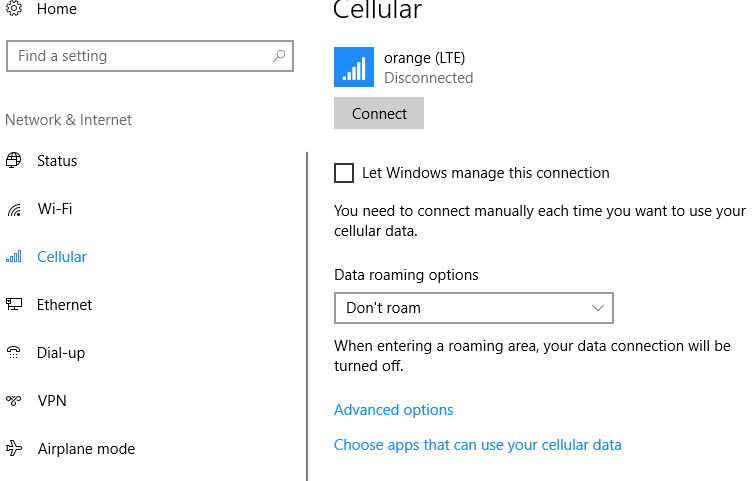
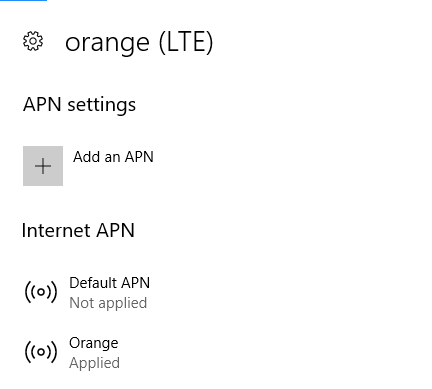
Setare APN in Windows 10 Data 13/11/2017 Autor Florin Mi. Categorie Configurare program, Mobile, OS - Windows, Stații de lucru -8 3134 Configurare noua (How To) SituatiePentru a seta APN in Windows 10 trebuie urmati pasii de mai jos: Solutie Pasi de urmat Deschideti sectiunea retele: Si selectati Network and Internet Settings Selectati Cellular Selectati Advanced Options de pe partea dreapta Si adaugati APN ul dumneavoastra Tip solutiePermanent Etichetare: askitaskit.roInternet SettingsSetare APNSetare APN in Windows 10windows 10 Voteaza Up Down (51 din 110 persoane apreciaza acest articol) ShareTweetShare Despre Autor Florin Mi. Solutii Asemanatoare Framework Laptop — A new approach to personal computing -2 How to use LAMBDA in Excel to create scalable, reusable functions 2 Cum repari ecranul negru în OBS Studio 1 How to find BitLocker recovery key on Windows 11 -1 Error when downloading large Files from a WebDAV-Mapped SharePoint Library 3 How to manually Install Windows Updates using the Microsoft Update Catalog 1 Leave A Comment? × Cancel Reply Save my name, email, and website in this browser for the next time I comment. 9 − 3 =
Leave A Comment?