
Follow Us

Soluții pentru problemele tale IT

Home /Stații de lucru/OS - Windows/Cum dezactivezi optiunea de a introduce parola cand calculatorul iese din sleep

Cum dezactivezi optiunea de a introduce parola cand calculatorul iese din sleep

  • Data 09/03/2018
  • Autor Mihai Geambasu
  • Categorie OS - Windows
  • -13
  • 1569
Configurare noua (How To)

Situatie

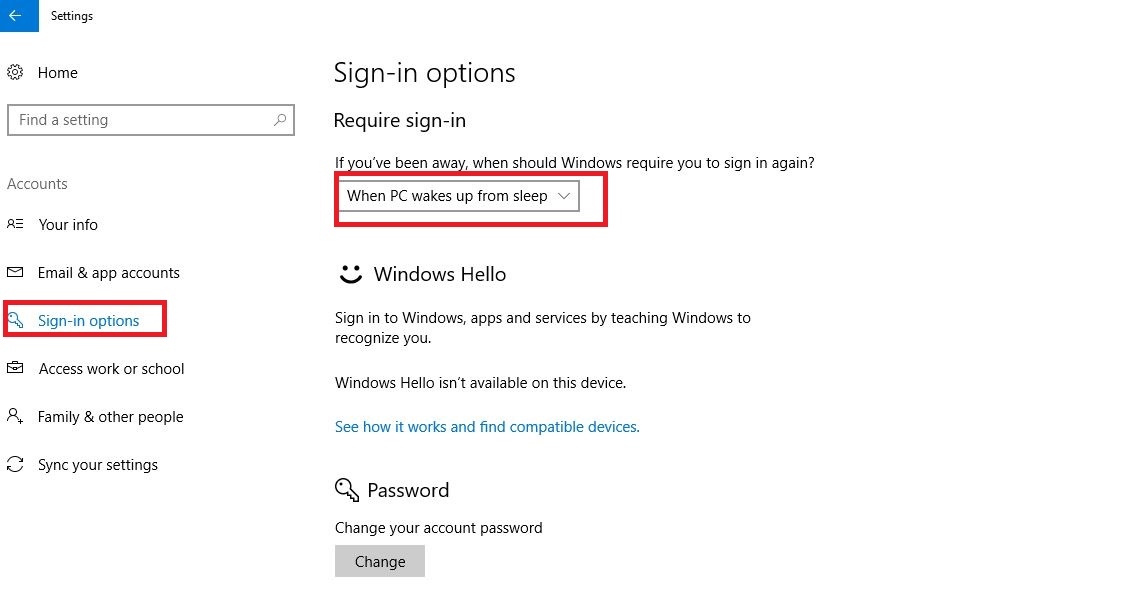
Cand calculatorul intra in sleep trebuie sa iti reintroduci parola de utilizator

Solutie

Apesi pe Start->Settings->Accounts-< Sign-in Options si selectezi “When PC wakes up from sleep” in loc de never
Tip solutie

Permanent

Plan de restaurare in caz de nefunctionare

Procesul este reversibil

Etichetare: accountaskitaskit.rocalculatorCum dezactivezi optiunea de a introduce parola cand calculatorul iese din sleepparolasettingsSign inSleepWhen PC wakes up from sleep

Voteaza

Up Down
(20 din 53 persoane apreciaza acest articol)
Share
Tweet
Share

Despre Autor

Mihai Geambasu

Solutii Asemanatoare

  • How to add Custom Text in Excel Header and Footer in Excel on Windows 10/11 0
  • How to open Headers and Footers from the Insert Tab in Excel on Windows 10/11 0
  • How to open Headers and Footers from the View Tab in Excel on Windows 10/11 2
  • How to open Headers and Footers from the Page Layout Tab in Excel on Windows 10/11 0
  • How to factory reset Windows 11 removing everything 2
  • How to reinstall Windows 11 without losing files 1

Leave A Comment? × Cancel Reply

30808

Soluții Disponibile

0 Articole

In ultima saptamana

Cele mai recente soluții

  • How to add Custom Text in Excel Header and Footer in Excel on Windows 10/11
    • 13
    • 1 day ago
  • How to open Headers and Footers from the Insert Tab in Excel on Windows 10/11
    • 11
    • 05/01/2026
  • How to open Headers and Footers from the View Tab in Excel on Windows 10/11
    • 12
    • 05/01/2026
  • How to open Headers and Footers from the Page Layout Tab in Excel on Windows 10/11
    • 13
    • 05/01/2026
  • How to factory reset Windows 11 removing everything
    • 12
    • 4 days ago
© Askit.ro, 2014 - 2026. All rights reserved. Done by Class IT
Share
Tweet
Share