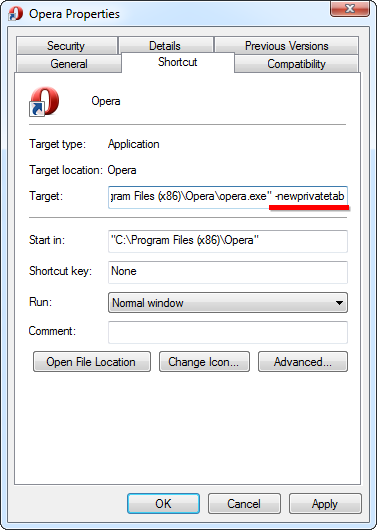
Cum sa navighezi privat folosind Opera Data 16/03/2015 Autor Radu P Categorie OS - Windows, Aplicatii specifice, Stații de lucru -2 992 Configurare noua (How To) SituatieSe doreste navigarea privata cu Opera Solutie Pasi de urmat Click dreapta pe iconita din taskbar click dreapta pe Opera – properties La tabul shorcut, in text box-ul Target se scrie ca parametru -newprivatetab OK Tip solutiePermanent Voteaza Up Down (16 din 34 persoane apreciaza acest articol) ShareTweetShare Despre Autor Radu P Solutii Asemanatoare Cum dezinstalam eficient aplicatii in Windows 1 Fișierele sunt șterse automat pe Windows 11 2 Fișierele de recuperare BIOS nu pot fi găsite sau fișierele sunt corupte 1 How to add Custom Text in Excel Header and Footer in Excel on Windows 10/11 1 How to open Headers and Footers from the Insert Tab in Excel on Windows 10/11 0 How to open Headers and Footers from the View Tab in Excel on Windows 10/11 2 Leave A Comment? × Cancel Reply Save my name, email, and website in this browser for the next time I comment. − two = 2
Leave A Comment?
