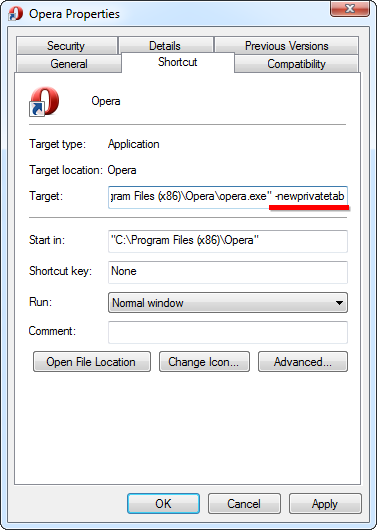
Cum sa navighezi privat folosind Opera Data 16/03/2015 Autor Radu P Categorie OS - Windows, Aplicatii specifice, Stații de lucru -1 1100 Configurare noua (How To) SituatieSe doreste navigarea privata cu Opera Solutie Pasi de urmat Click dreapta pe iconita din taskbar click dreapta pe Opera – properties La tabul shorcut, in text box-ul Target se scrie ca parametru -newprivatetab OK Tip solutiePermanent Voteaza Up Down (21 din 43 persoane apreciaza acest articol) ShareTweetShare Despre Autor Radu P Solutii Asemanatoare Cum acordam permisiunile necesare AnyDesk pe macOS pentru control complet la distanta 3 iPad conectat la Windows afiseaza Internal Storage, dar nu permite crearea unui folder 5 Cum rulam o aplicatie web veche care necesita ActiveX in Microsoft Edge folosind Internet Explorer Mode 0 Windows 11 nu poate accesa un NAS vechi care foloseste SMB Guest 1 How to fix error message “IS052 InstallNetworkDriver” for brother printers on Windows 10/11 0 How to disable automatic updates to Logitech G HUB on Windows 10/11 via Windows Services -1 Leave A Comment? × Cancel Reply Save my name, email, and website in this browser for the next time I comment. × 2 = twelve
Leave A Comment?
