
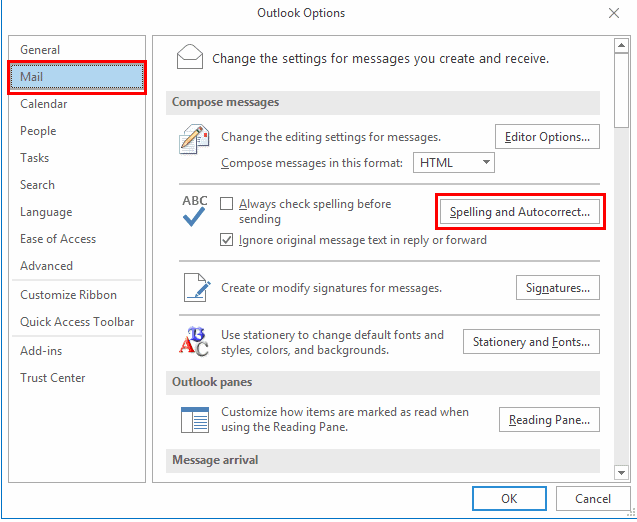
Cum dezactivezi autocorectul in Outlook Data 21/07/2019 Autor Razvan Bur Categorie E-mail -10 1292 Configurare noua (How To) SituatieAtunci cand vrei sa compui un e-mail, iar autocorectul nu te ajuta si vrei sa il dezactivezi, poti urma procedura de mai jos pentru a-l dezactiva. Solutie Deschizi Outlook->File->Options->Mail->Spelling and Autocorrect… Aici poti dezactiva autocorectul. Tip solutiePermanent Voteaza Up Down (26 din 62 persoane apreciaza acest articol) ShareTweetShare Despre Autor Razvan Bur Solutii Asemanatoare 6 ways to speed up email management in Outlook 5 Cum rezolvăm alerta “SMTP Address Has No Mailbox Associated” 11 Outlook is not sending or receiving emails – Error 0x800CCC0E 5 Configurare perfectă ISPConfig Multiserver pe Ubuntu 24.04 și Debian 12 4 Configurare MailChimp 3 Ghid remediere eroare 58tm1 – Microsoft Office 10 Leave A Comment? × Cancel Reply Save my name, email, and website in this browser for the next time I comment. 9 + 3 =
Leave A Comment?