Soluții

How to Check if a USB-C Cable Supports Fast Charging

Fast charging is a relatively recent addition to smartphones that has become common. Some devices can be charged from 0-100 in less than an hour. It’s pretty awesome, but it doesn’t work with just any old USB-C cable.
A typical USB port sends around 2.5W of power to the connected device. Fast charging bumps this up to 15W on the low end, while some go all the way up to 100W. If you want to take advantage of these faster charging speeds, you’ll need to make sure you have compatible accessories.
[mai mult...]

Speed up shutdown time using regedit

When you shut down your PC, Windows gives a bit of time to running applications to save their data before it force closes them. This ensures that no unsaved app data is lost and no app functions get corrupted due to force stopping in the middle of working.

However, if faster shutdown matters to you and you have the good habit of closing all apps and saving data before you shut down, then you can decrease this timer to speed up shutdown.

[mai mult...]

How to Test Open Ports in Linux

Whether you are troubleshooting network connectivity issues or configuring a firewall, one of the first things to check is what ports are actually opened on your system.

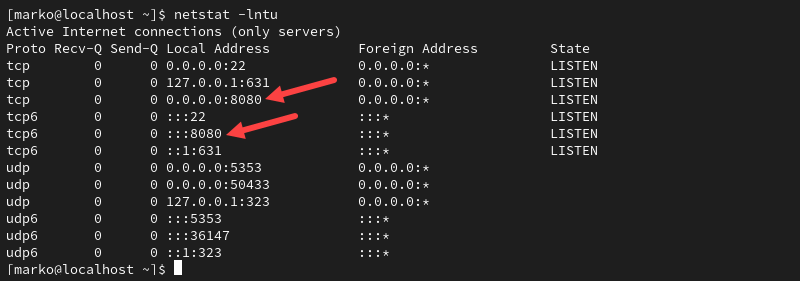
View the listening ports with the netstat command:

netstat -lntu

Viewing open ports with the netstat command.

The output above shows the port 8080 is opened.

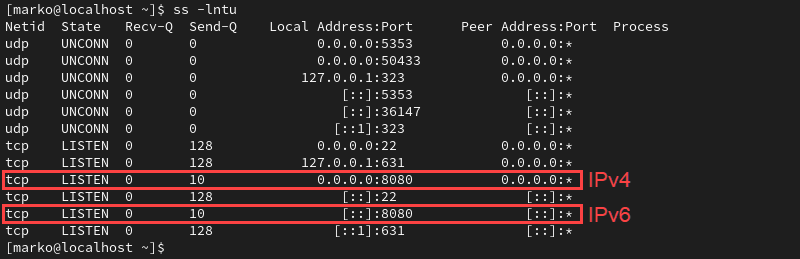
List the open sockets with the ss command:

ss -lntu

The port appears as part of the socket.

Viewing open ports with the ss command.

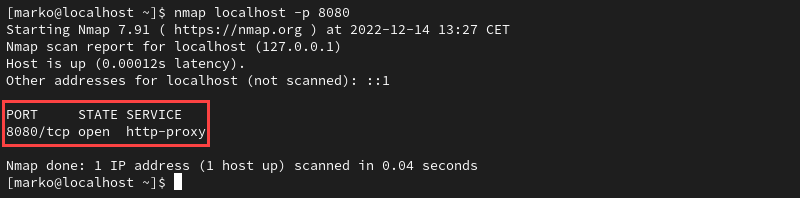
Test the port by specifying its number to the nmap command.

nmap localhost -p 8080

Using the nmap command to see port status in linux.
Test the Port with the Netcat Utility

The Netcat tool features the nc command that you can use to test an open port. To do so:

1. Use a command such as echo to pipe output to Netcat and specify the port to listen to. The example below pipes a message to test port 8

echo “Testing port 8080” | nc -l -p 8080

2. Leave the command running and open another terminal window.

3. In that terminal window, use a command such as telnet to query the local socket.

telnet localhost 8080

If the port is open, the output of the telnet command contains the message piped to nc in step 1.

Using the telnet command to probe a port in Linux.

[mai mult...]