Sound BlasterX G5 audio device for P.C.
Setting the Sound BlasterX G5 as the default audio device for P.C.
[mai mult...]
Soluții pentru problemele tale IT

Setting the Sound BlasterX G5 as the default audio device for P.C.
[mai mult...]There are many websites that do not allow to download the content in form of pdf, they either ask to buy their premium version or don’t have such download service in form of pdf.
[mai mult...]All of you must be familiar with what PDFs are. In fact, they are one of the most important and widely used digital media. PDF stands for Portable Document Format. It uses .pdf extension. It is used to present and exchange documents reliably, independent of software, hardware, or operating system.
[mai mult...]PDF (Portable Document Format) may be a file format that has captured all the weather of a printed document as a bitmap that you simply can view, navigate, print, or forward to somebody else. PDF files are created using Adobe Acrobat.
[mai mult...]Activate Youtube using Youtube.com/activate is a simple procedure you need to complete using a phone, tablet or a PC in order to begin using the video streaming service on your Smart TV, Xbox, Switch or another device. This procedure binds the device with user’s Google account and starts the sign-in process. Connecting Google account to TV allows to watch videos from the video-sharing platform.
The user is required to enter the code displayed on TV screen to Youtube.com/activate, which starts the app activation. Unfortunately, the instructions provided by the YT app itself are very brief, which causes confusion for the users.
[mai mult...]Certificatele SSL sunt esențiale pentru ca HTTPS și criptarea modernă să funcționeze corect. Google Chrome a modificat ocazional locul în care puteți vizualiza certificatul SSL al site-ului web pe care îl vizitați.
Inițial, Google Chrome vă permitea să vizualizați certificatele SSL făcând click pe pictograma de blocare din apropierea barei de adrese, dar a mutat această funcție în jurul lui Chrome 55. În versiunile moderne ale Google Chrome, detaliile certificatului SSL au revenit la pictograma de blocare.
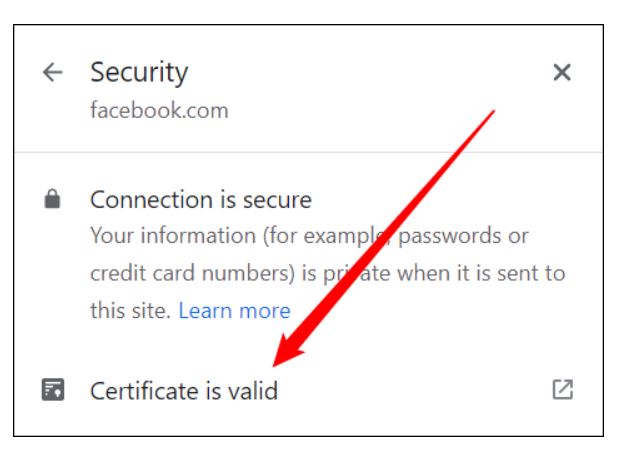
Faceți click pe pictograma mică de lacăt din partea stângă a barei de adrese, apoi faceți click pe mesajul care spune “Conexiunea este securizată”.

Faceți click pe “Certificate is Valid” pentru a vedea mai multe informații.