Soluții
Use BYCOL to build future-proof, scalable Excel reports
BYCOL is the ultimate tool for scalable column math in Excel. By replacing dozens of individual formulas with one “brain” cell, you eliminate the risk of manual errors and broken ranges. It’s the fastest way to upgrade a fragile spreadsheet into a future-proof, automated dashboard.
[mai mult...]Stop manually clicking checkboxes in Excel—automate them with formulas instead
The addition of native in-cell checkboxes to Excel in 2024 finally ended the era of clunky, floating checkboxes from the Developer tab. They’re simple to add and manually check—but this ease of use is a trap. If a human can toggle a checkbox, a single click can break a whole spreadsheet. For a pro-level workbook, your checkboxes should be driven by formulas, not people.
[mai mult...]Ghid de export și monitorizare al utilizatorilor în FortiGate
[mai mult...]Gestionarea funcției Meeting Insights și a conținutului sugerat
Functia Meeting Insights/Suggested Content analizeaza automat contextul intalnirii si ataseaza documente recente sau relevante in fereastra de calendar a participantilor, ceea ce poate duce la expunerea nedorita a unor fisiere sensibile.
[mai mult...]How to remove a Microsoft account from Windows 11
Having a Microsoft account connected to Windows 10 or Windows 11 provides a smoother, more integrated experience across all the devices where you are signed in. It also allows you to download apps from the Microsoft Store and access other Microsoft services.
However, if you decide that you no longer want to use a Microsoft account on Windows 11, you can remove it after setting up a local account. Let’s explore a few ways to delete your Microsoft account from Windows 11.
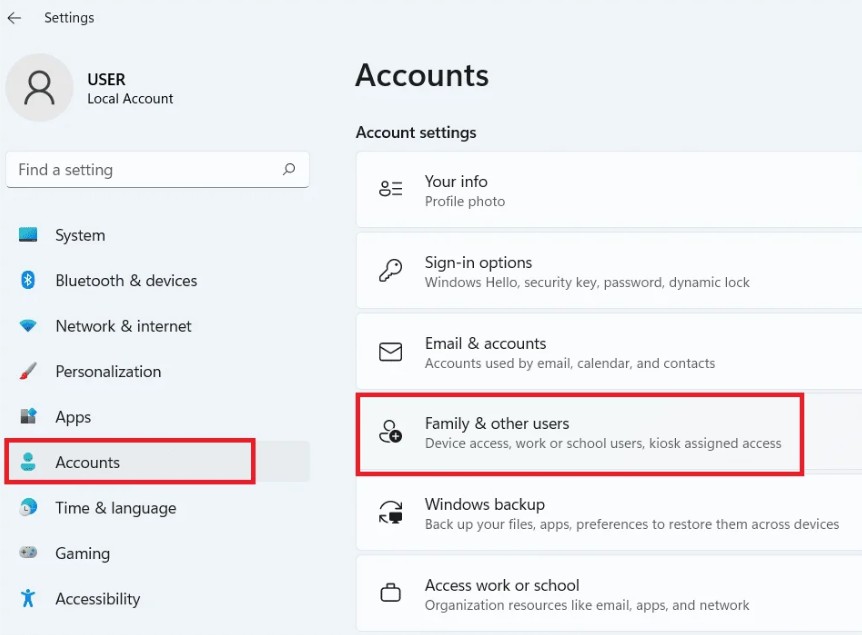
- Type Settings in the search box and open the Settings app
- Select Account > Family & other users
3. Click the drop-down arrow next to the Microsoft account you want to remove. Then, select the “Remove” button under Account and Data.
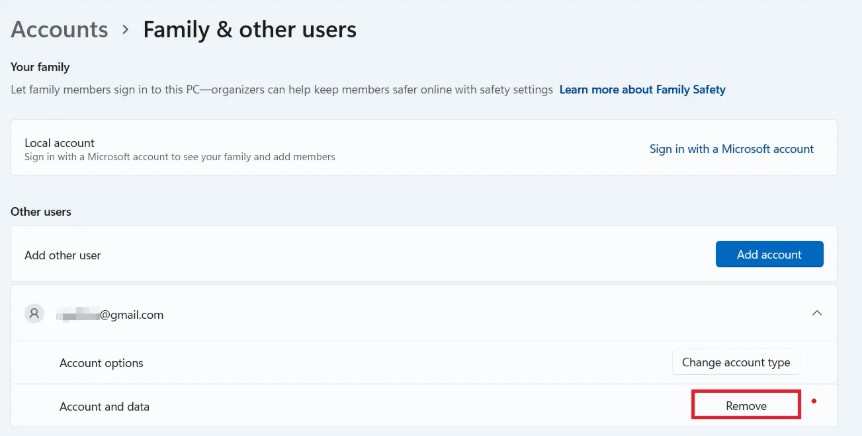
4. Click on Delete account and data
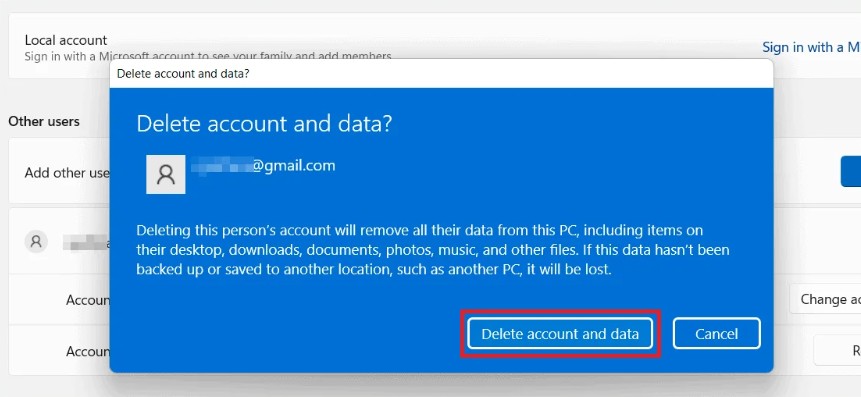
5. In the confirmation window, click “Delete account and data” to finish deleting the account and all associated data.