How to Turn Off Steam’s Popup Ads
Când lansați Steam, în mod normal apare o fereastră pop-up cu reclame pentru actualizări ale jocurilor pe care le dețineți și jocuri noi. Iată cum puteți dezactiva aceste reclame pop-up.


Soluții pentru problemele tale IT

Când lansați Steam, în mod normal apare o fereastră pop-up cu reclame pentru actualizări ale jocurilor pe care le dețineți și jocuri noi. Iată cum puteți dezactiva aceste reclame pop-up.
LinkedIn este o modalitate excelentă de a vă conecta cu profesioniști din domeniul dvs., de a găsi oportunități de angajare și de a vă dezvolta datele de acreditare. Cu toate acestea, setările sale de confidențialitate pot fi confuze și dificil de gestionat. Iată cum să remediați asta.
[mai mult...]Push to Talk vă permite să controlați zgomotul de fundal atunci când comunicați cu prietenii dvs. în Discord. Uneori, însă, factori externi precum Windows 10 sau alte aplicații pot împiedica funcția să funcționeze corect. Iată cum puteți rezolva problemele comune.
[mai mult...]Observant Firefox users on Windows who have updated the web browser to Firefox 75 may have noticed that the upgrade brought along with it a new scheduled tasks. The scheduled task is also added if Firefox 75 is installed on a Windows device. The task’s name is Firefox Default Browser Agent and it is set to run once per day. Mozilla published a blog post on the official blog of the organization that provides information on the task and why it has been created.

According to Mozilla, the task has been created to help the organization “understand changes in default browser settings”. At its core, it is a Telemetry task that collects information and sends the data to Mozilla.
Here are the details:
Mozilla added the file default-browser-agent.exe to the Firefox installation folder on Windows which defaults to C:\Program Files\Mozilla Firefox\.
Firefox users have the following options if they don’t want the data sent to Mozilla:
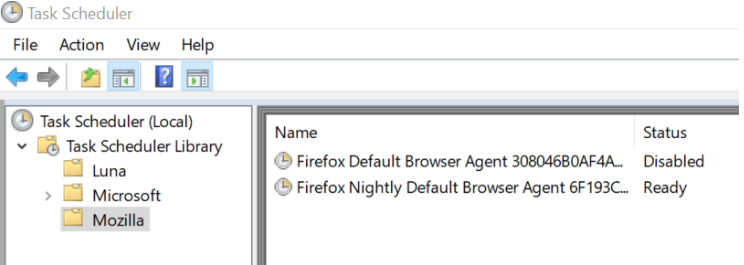
Here is how you disable the task:
The task won’t be executed anymore once it is disabled.
The new Telemetry task is only introduced on Windows and runs only if Telemetry is enabled (which it is by default). Mozilla is transparent about the introduction and while that is good, I’d preferred if the company would have informed users about it in the browser after the upgrade to Firefox 75 or installation of the browser and before the task is executed the first time.
[mai mult...]If you monitor the connections your computer makes, you may have noticed that a program called pingsender.exe is making regular connections to the Internet. Depending on the program or service that you use to monitor connections, you may get additional information right away. Windows Firewall Control for instance displays the remote IP address of the connection attempt, and the organization that signed the executable files.
That organization is Mozilla Corporation, and the IP address belongs to Amazon’s cloud service AWS.
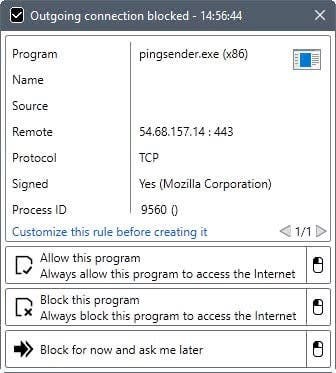
You may have noticed as well that pingsender.exe springs to action whenever you close the Firefox web browser. The article “Getting Firefox data faster: the shutdown pingsender” by Alessio Placitelli provides additional information on the executable file.
Firefox collects data if telemetry collecting is enabled. The browse transfers the data regularly to Mozilla in intervals. A big chunk of data was sent to Mozilla on the start of the next browsing session up until recently.
The issue was that this could mean that Mozilla would get the data hours, days or even weeks after it had been collected by the browser.
Pingsender is activated from the second browsing session on. It is launched as a separate process during Firefox shut down, and attempts to send the telemetry data that was collected during the browsing session to Mozilla.
Mozilla managed to reduce the sending time significantly. According to Placitelli, 85% of pings reach Mozilla within an hour, and 95% do so within the first 8 hours. Only 25% of pings reached Mozilla in the first hour without pingsender, and it took 90 hours to reach the 95% level of pings without pingsender.
In short: Pingsender is a separate process that Firefox spawns on shut down to send telemetry data to Mozilla.
Firefox users may load about:telemetry in the browser’s address bar to check the data that Mozilla is collecting.
Those who don’t want to provide Mozilla with data can turn the data off under about:preferences#privacy.
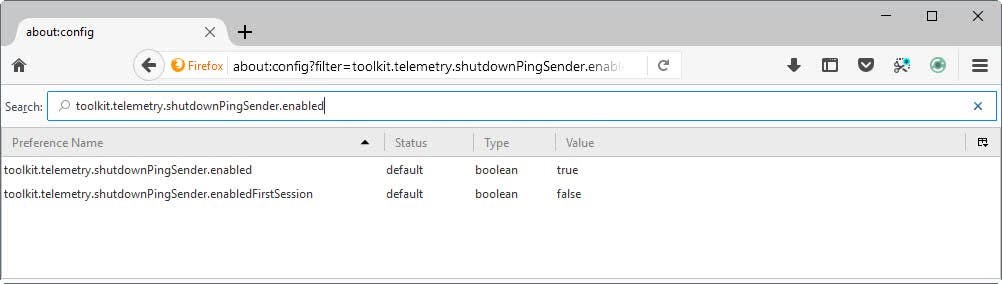
Another option is available. If Pingsender.exe is the problem, you may turn that feature off in the following way:
This feature will probably only be useful to a narrow niche of users, but if you like to dig your virtual fingers into the innards of Windows via the Command Prompt, Windows 10 provides a ghostly way to interface with it.
[mai mult...]