
Soluții

Utilizarea fisierului Hosts pentru blocare acces internet

Se poate utiliza fisierul hosts pentru a bloca reclame, banere, cookie-uri 3rd party, contoare de pagina, web bugs, etc.
Calea catre acest fisier in Windows 8/7/Vista/XP este in mod normal “C:\WINDOWS\SYSTEM32\DRIVERS\ETC”.

Pentru aflarea locatiei exacte porniti regedit si parcurgeti calea: HKEY_LOCAL_MACHINE\SYSTEM\CurrentControlSet\Services\Tcpip\Parameters\DataBasePath

hosts1.JPG

Nota! Numele folderului “Windows” poate sa difere daca a fost modificat la instalare, de exemplu “Win8”; de asemenea, disk-ul de sistem ar putea fi altul decat “C:” daca din cine stie ce motive a fost utilizat un alt disk.
Puteti afla rapid care este %SystemRoot% tastand la Command prompt comanda: “dir %SystemRoot%”:

hosts2.JPG

In Windows 8 aceasta cale trebuie adaugata la exceptii in Windows Defender, altfel antivirusul va sesiza modificarea fisierului hosts si va considera ca un malware a facut acest lucru:

hosts3.JPG

Faceti mai intai un backup la fisierul hosts, apoi salvati in locul lui fisierul HOSTS modificat. Pentru aceasta aveti nevoie de drepturi de administrator.

Reporniti computerul si veti beneficia de un browsing mai sigur!

[mai mult...]
Activați AVIF support în Mozilla Firefox

Începând cu Mozilla Firefox 77(versiune beta momentan) este posibil să activați suportul formatului de imagine AVIF în browser. Acest lucru poate fi util pentru site-urile web care utilizează în mod activ acest format modern pentru a furniza conținut multimedia bogat utilizatorului final.

[mai mult...]

C++ for loop

A for loop is a repetition control structure that allows you to efficiently write a loop that needs to execute a specific number of times.

The syntax of a for loop in C++ is −

for ( init; condition; increment ) {
   statement(s);
}

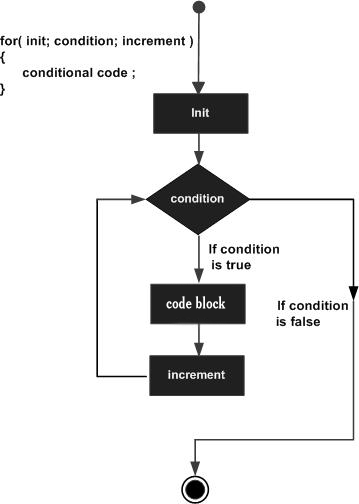
Here is the flow of control in a for loop −

  • The init step is executed first, and only once. This step allows you to declare and initialize any loop control variables. You are not required to put a statement here, as long as a semicolon appears.
  • Next, the condition is evaluated. If it is true, the body of the loop is executed. If it is false, the body of the loop does not execute and flow of control jumps to the next statement just after the for loop.
  • After the body of the for loop executes, the flow of control jumps back up to the increment statement. This statement can be left blank, as long as a semicolon appears after the condition.
  • The condition is now evaluated again. If it is true, the loop executes and the process repeats itself (body of loop, then increment step, and then again condition). After the condition becomes false, the for loop terminates.


[mai mult...]