Soluții

Cum se setează metoda de executare cu PowerShell?

# Restricted – No scripts can be run. Windows PowerShell can be used only in interactive mode.
Set-ExecutionPolicy -ExecutionPolicy Restricted
# AllSigned – Only scripts signed by a trusted publisher can be run.
Set-ExecutionPolicy -ExecutionPolicy AllSigned
# RemoteSigned – Downloaded scripts must be signed by a trusted publisher before they can be run.
Set-ExecutionPolicy -ExecutionPolicy RemoteSigned
# Unrestricted – No restrictions – All Windows PowerShell scripts can be run.
Set-ExecutionPolicy -ExecutionPolicy Unrestricted
[mai mult...]

Programming Telephone Systems Panasonic KX-TA824

PT Programming—Instructions

Required Telephone

PBX settings can be customized through system programming by using a proprietary telephone (PT) with a display, such as the KX-T7731. An authorized administrator or the manager extension connected to extension jack 01 can access system programming.

Entering System Programming Mode

Using a PT to perform system programming allows an authorized administrator to set a wide range of PBX features and parameters. To enter system programming mode, the system password is required. With the system password, all system programming is accessible.

Notes
means default value throughout these programming instructions.

Entering Manager Programming Mode
Using a PT to perform manager programming allows the manager extension (extension jack 01) to set certain PBX features and parameters. To enter manager programming mode, the extension password for the manager (manager password) is required.
With the manager password, the following 4 system programming settings are accessible:
•[001] System Speed Dialing Number
•[011] System Speed Dialing Name
•[512] DISA Security Code
•[530] DISA Security Code Digits

Notes
•The system password may be entered instead of the manager password.
•With the manager password, the manager can also set a password to each extension. For moreinformation on how to assign a password to each extension including the manager password, referto the Operating Manual ( 2.1.7 System Feature Assignment).

Entering Characters
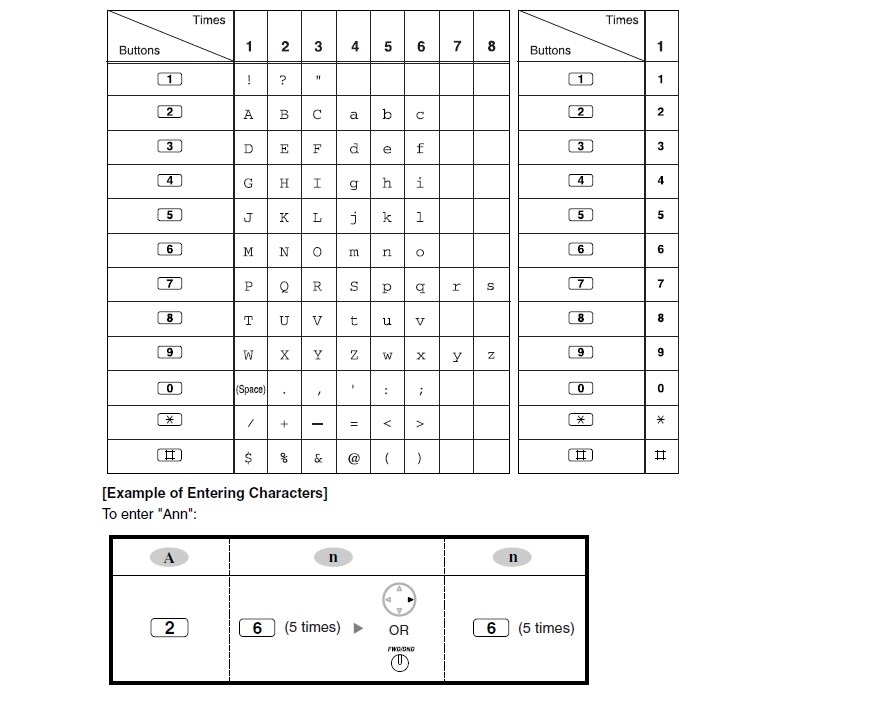
The PT’s dialing buttons can be used to enter characters when storing a name or message. The following tables depict the available characters:
Table 1 (Alphabet mode)/Table 2 (Numeral mode)

Notes
•To toggle between “Alphabet mode” and “Numeral mode”, press SELECT.
•To move the cursor right, press.
•To delete all characters, press CLEAR. To delete a character, press.

[mai mult...]