

Soluții
iOS 17.2: How to translate Speech with iPhone’s action button
Overcome communication barriers with the new custom Translation option for the iPhone’s Action button in iOS 17.2.
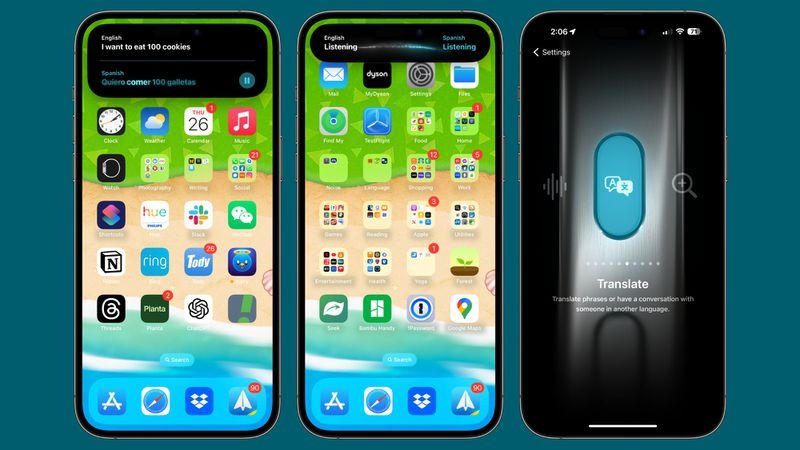
If you have an iPhone with an Action button, such as the iPhone 15 Pro, Apple’s iOS 17.2 software update brings a new translation option for the button that allows you to translate live conversations into multiple languages.
According to Apple, the translation is not just accurate but also context-aware, ensuring that nuances and colloquialisms are captured effectively. The feature should be a boon for travelers, students, and anyone learning a language.
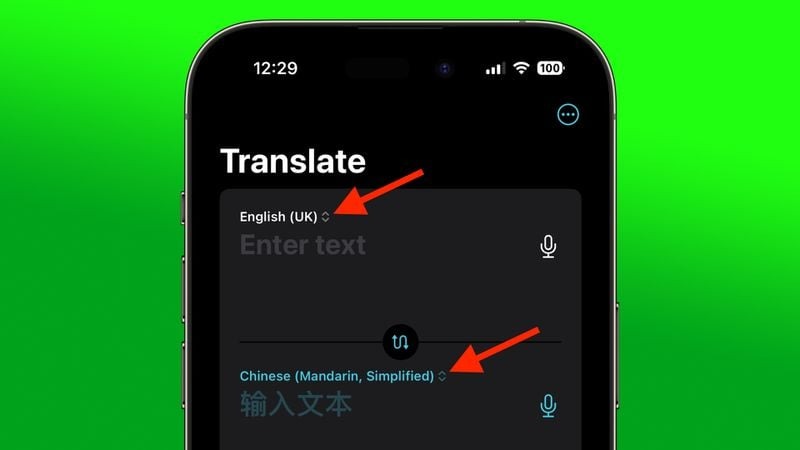
Before you use the Translate function, it’s important to choose which language you want to translate. You can do this via Apple’s built-in Translate app. On the app’s main screen, use the chevrons next to the languages to make your selection.
Assign Translate to Action Button
Once you have chosen your languages, you are ready to select the Translate option for the Action button.
What is Windows 11 Smart App control and how do you enable it?
[mai mult...]How to fix HyperVisor Windows 11 Bluescreen error by Switching the hypervisor launch prompt
Are you experiencing a Bluescreen error tagged with the stop code “HYPERVISOR ERROR“? As the Hyper-V feature gets used extensively to manage virtual machines on Windows 11, 10, these types of Hypervisor errors are not uncommon.
[mai mult...]How to fix HyperVisor Windows 11 Bluescreen error by enabling virtualization
Are you experiencing a Bluescreen error tagged with the stop code “HYPERVISOR ERROR“? As the Hyper-V feature gets used extensively to manage virtual machines on Windows 11, 10, these types of Hypervisor errors are not uncommon.
[mai mult...]Fix – Error Code 0xc00000e9 There was a problem with a device connected by Rebuilding the boot directory
The Error Code 0xc00000e9 can appear under the Blue Screen of Death issue on your computer screen. There are certain scenarios where this error code may appear, but usually this is related to an external device malfunction. You have to rebuild the boot directory of the computer and you can do this from the terminal only. You have to force reboot the system to reach the Windows Diagnostics.
[mai mult...]