Situatie
Doriti sa afiseze taskbar-ul pe toate monitoarele secundare conectate la laptop/desktop.
Solutie
Pasi de urmat
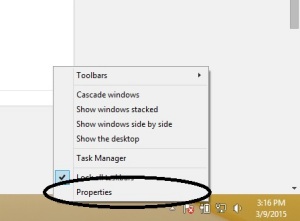
Apasam click dreapta pe taskbar apoi selectam proprietati
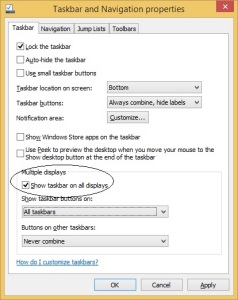
In fereastra noua bifam “Show taskbar on all displays”

Soluții pentru problemele tale IT
Doriti sa afiseze taskbar-ul pe toate monitoarele secundare conectate la laptop/desktop.
Apasam click dreapta pe taskbar apoi selectam proprietati
In fereastra noua bifam “Show taskbar on all displays”
Leave A Comment?