
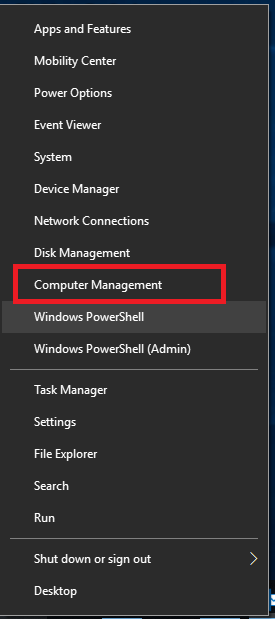
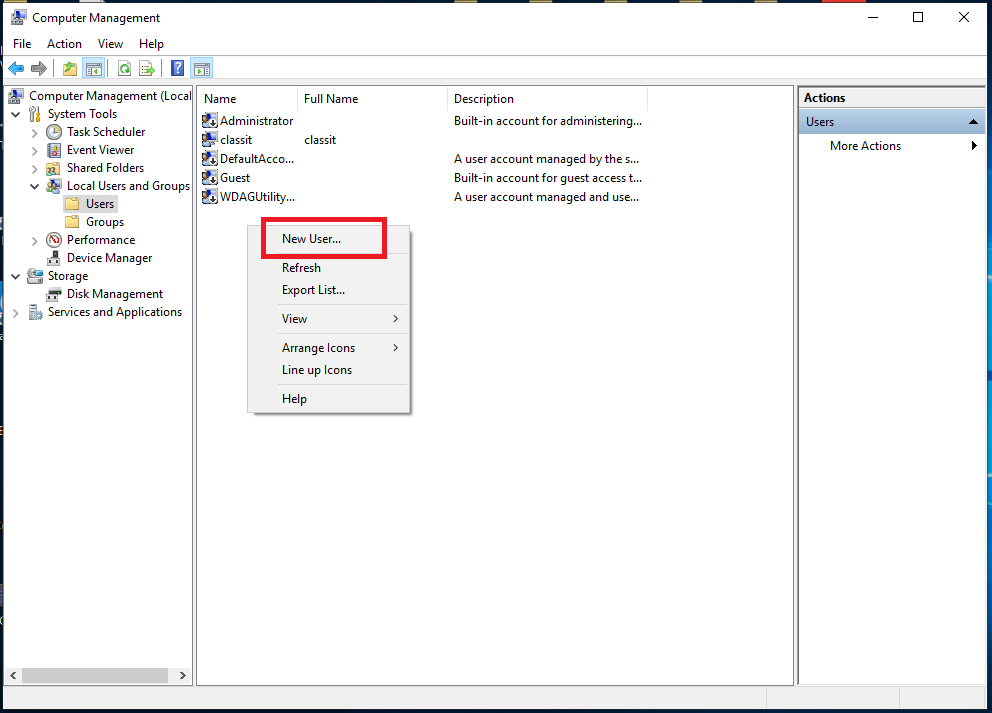
Crearea unui nou cont de utilizator local în Windows 10 Data 08/10/2019 Autor alexandru vasilief Categorie OS - Windows -10 750 Configurare noua (How To) SituatieCrearea unui nou cont de utilizator local în Windows 10 Solutie Pasi de urmat Click drepta pe butonul de Start Alegem Computer Management Selectam Local Users and Groups, apoi Users Click drepta si alegem New User Completam campurile si click pe Create Tip solutiePermanent Voteaza Up Down (23 din 56 persoane apreciaza acest articol) ShareTweetShare Despre Autor alexandru vasilief Solutii Asemanatoare Shortcut close the current window of Google Chrome -1 Shortcut close the current tab in Google Chrome 1 Shortcut open a new tab and switch to it in Google Chrome 3 Shortcut open a new window in Google Chrome -1 How to install and configure AnduinOS 3 Garuda Linux guide -1 Leave A Comment? × Cancel Reply Save my name, email, and website in this browser for the next time I comment. × eight = fifty six
Leave A Comment?