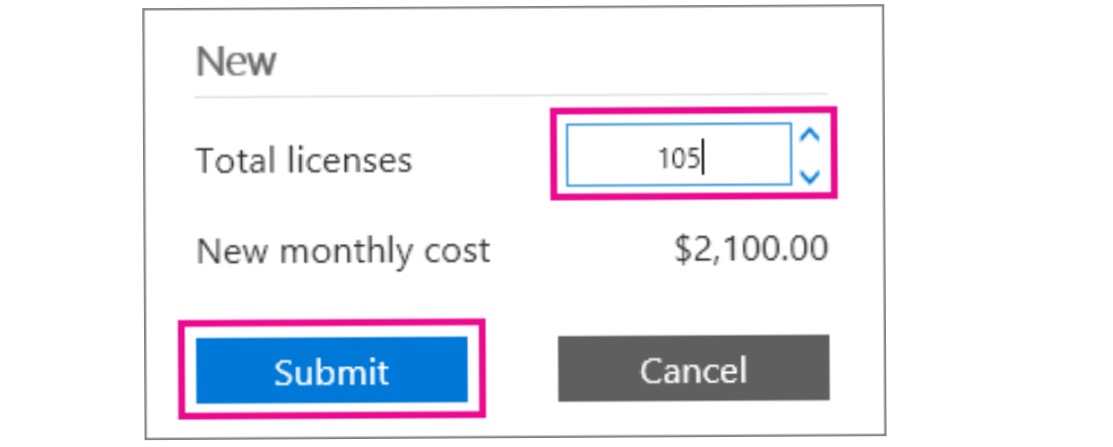
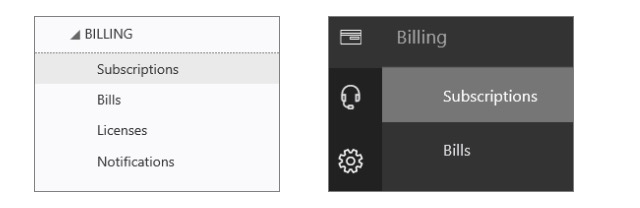
Cum adaugam licente de mailbox in Office365! Data 11/05/2016 Autor Ionut Te. Categorie E-mail -19 1113 Configurare noua (How To) SituatieIn caz ca nu se mai pot crea mailboxuri pe office365 pentru ca nu mai exista licente se pot adauga noi licente urmand pasii : Solutie Pasi de urmat Selectati casuta de mai jos si alegeti Admin>Billing>Subscriptions In sectiunea Total licenses , mai adaugati numarul de licente de care aveti nevoie ! Tip solutiePermanent Voteaza Up Down (19 din 57 persoane apreciaza acest articol) ShareTweetShare Despre Autor Ionut Te. Solutii Asemanatoare Configurare client outlook pentru mail hostat in Postfix & Dovecot 2 Remedierea erorii 500 (Internal Server Error) în Dropbox 11 Gestionarea funcției Meeting Insights și a conținutului sugerat 0 Cum se instalează PHP 5.6 și 7.0 – 8.4 cu PHP-FPM și modul FastCGI pentru ISPConfig 3.2 cu apt pe Debian 11 până la 12 5 5 Gmail features you can turn off -3 5 Outlook tools that save me time every single day 2 Leave A Comment? × Cancel Reply Save my name, email, and website in this browser for the next time I comment. five + = 12

Leave A Comment?