
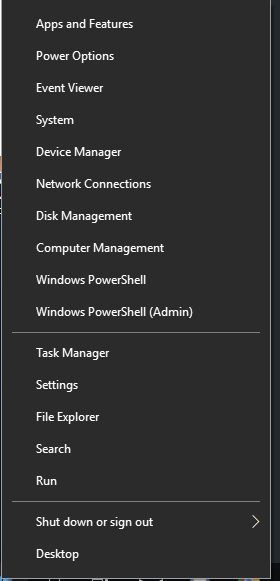
Cum aflam serviciile care sunt in status Running din Powershell Data 12/04/2019 Autor Cristian Anghel Categorie OS - Windows -4 768 Configurare noua (How To) SituatiePentru a afla care sunt serviciile running din PowerShell, se pot urma pasii de mai jos: Solutie Pasi de urmat Click dreapta pe start: De aici vom selecta Windows Powershell (Admin): Introducem urmatoarea comanda : Get-Service | Where-Object {$_.Status -eq “Running”} Dupa introducerea acesteia, vor fi afisate toate serviciile care sunt running. Tip solutiePermanent Etichetare: Verificare servicii in powershell Voteaza Up Down (22 din 48 persoane apreciaza acest articol) ShareTweetShare Despre Autor Cristian Anghel Solutii Asemanatoare Cum urmărești doar o parte dintr-o fereastră cu PowerToys Crop And Lock -3 Windows 11 – previzualizarea fișierelor PDF nu funcționează în File Explorer 7 How to verify Windows 11 ISO file authenticity using PowerShell 4 Sistem de supraveghere video Dahua folosind PC în loc de NVR 6 Cum repari rapid o imagine corruptă de Windows când comanda sfc /scannow eșuează -6 Cum verifici dacă un port TCP este deschis pe un server sau echipament din rețea fără utilitare terțe 6 Leave A Comment? × Cancel Reply Save my name, email, and website in this browser for the next time I comment. 3 × = fifteen
Leave A Comment?