
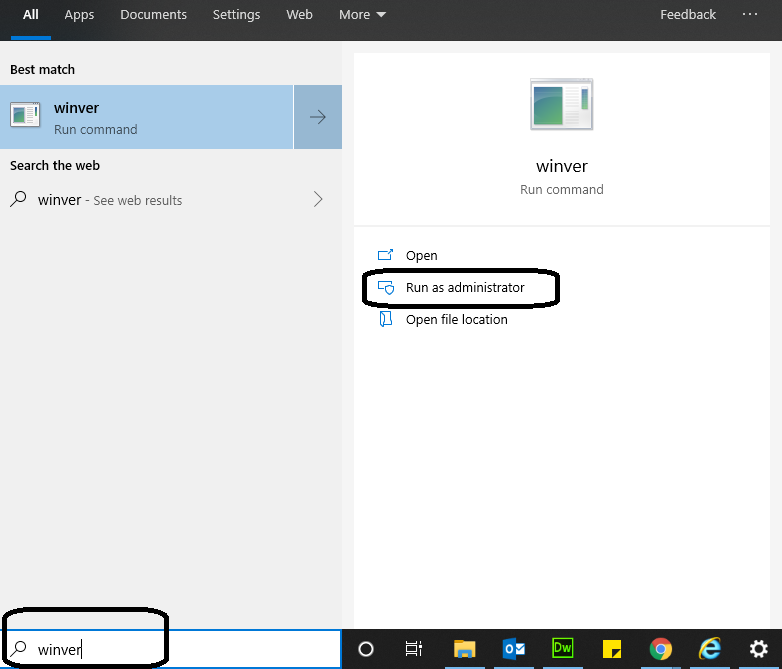
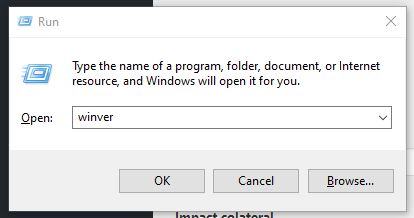
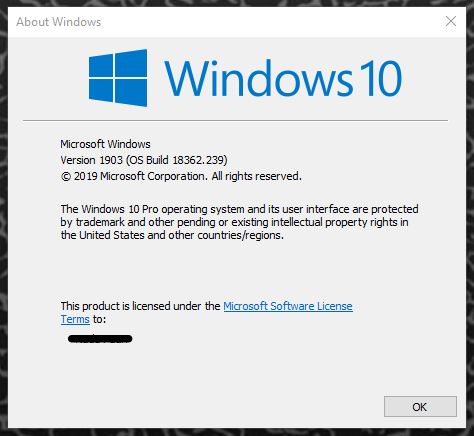
Cum aflu ce versiune de Windows am? Data 18/07/2019 Autor Tiberiu Gache Categorie OS - Windows -15 4086 Configurare noua (How To) SituatieDoriti sa aflati versiunea de Windows pe care lucrati. Solutie Pasi de urmat Tastati in search winver apoi click pe Open sau Run as administrator. Sau apasati tasta Windows + R si tastati winver, apoi apasati Enter: Vor aparea detaliile versiunii de Windows Tip solutiePermanent Etichetare: Cum aflu ce versiune de Windows am?winver Voteaza Up Down (35 din 85 persoane apreciaza acest articol) ShareTweetShare Despre Autor Tiberiu Gache Solutii Asemanatoare Spyware-ul pe înțelesul tuturor: cum îl eviți? 0 How to enable hidden CPU performance boost mode on Windows 11 0 Cum remediem: you can’t Sign in with this account error In Windows 11 2 Remediere: ASSIGN_DRIVE_LETTERS_FAILED 1 Shortcut close the current window of Google Chrome -1 Shortcut close the current tab in Google Chrome -1 Leave A Comment? × Cancel Reply Save my name, email, and website in this browser for the next time I comment. seven × = thirty five
Leave A Comment?