
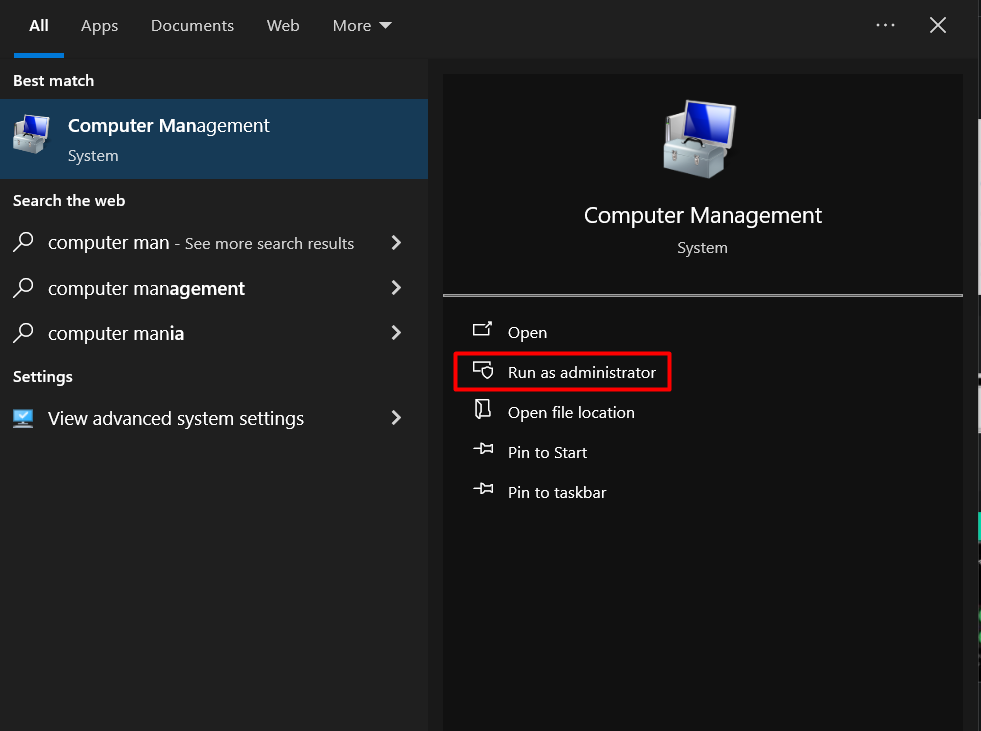
Cum deschizi Computer Management ca administrator Data 30/05/2024 Autor Andrei Muntianu Categorie OS - Windows, Soluții -7 352 Configurare noua (How To) SituatieDaca folosesti un user care nu are drepturi de administrator nu vei putea face mai nimic in computer management asa ca vei fi nevoit sa deschizi ca si administrator. Solutie Scriem in search computer management si selectam Run As Administrator. Tip solutiePermanent Etichetare: Computer ManagementComputer Management – Local Users and Groups Voteaza Up Down (15 din 37 persoane apreciaza acest articol) ShareTweetShare Despre Autor Andrei Muntianu Cel Mai Apreciat Autor Solutii Asemanatoare Stop using Rufus to burn ISOs, these 2 tools for Windows and Linux are better 3 How to setup CodeGPT + WSL and Ollama 2 Tuxedo OS install guide 3 Spyware-ul pe înțelesul tuturor: cum îl eviți? 3 Bypass Siri AI waitlist on macOS 27 Golden Gate Beta 4 How to enable hidden CPU performance boost mode on Windows 11 3 Leave A Comment? × Cancel Reply Save my name, email, and website in this browser for the next time I comment. + three = twelve
Leave A Comment?