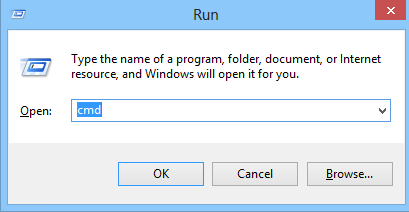
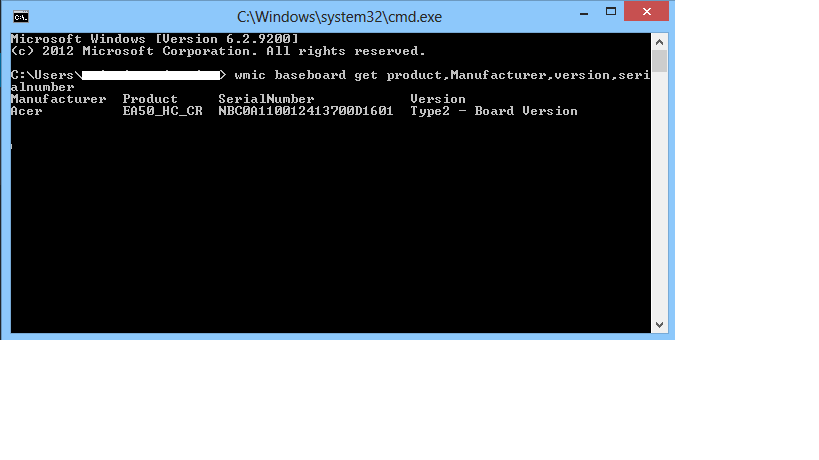
Cum obtinem informatii despre placa de baza direct din CMD Data 10/05/2016 Autor Cristian V Categorie OS - Windows -9 2246 Configurare noua (How To) SituatieDorim sa aflam informatii despre placa de baza, fara a utiliza diverse softuri sau fara sa desfacem fizic PC-ul Solutie Pasi de urmat Apasam WIN+R si scriem cmd Scriem comanda wmic baseboard get product,Manufacturer,version,serialnumber Tip solutiePermanent Voteaza Up Down (31 din 71 persoane apreciaza acest articol) ShareTweetShare Despre Autor Cristian V Solutii Asemanatoare Windows 11’s predictive text is the hidden typing tool 6 Analiza și remedierea Erorii 0x8024200B în Windows Server 2022 4 Analiza și remedierea erorii:„CONFIG INITIALIZATION FAILED” în Windows Server 0 Shortcut minimize the current window of Google Chrome 5 Shortcut open your home page in the current tab Google Chrome 4 Shortcut switch to the previous tab in Google Chrome 5 Leave A Comment? × Cancel Reply Save my name, email, and website in this browser for the next time I comment. seven + = fifteen
Leave A Comment?
