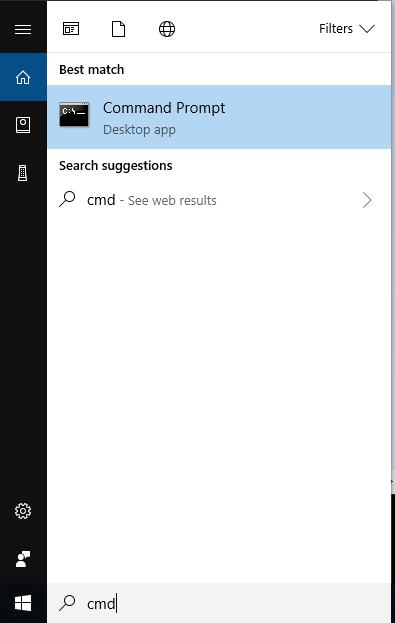
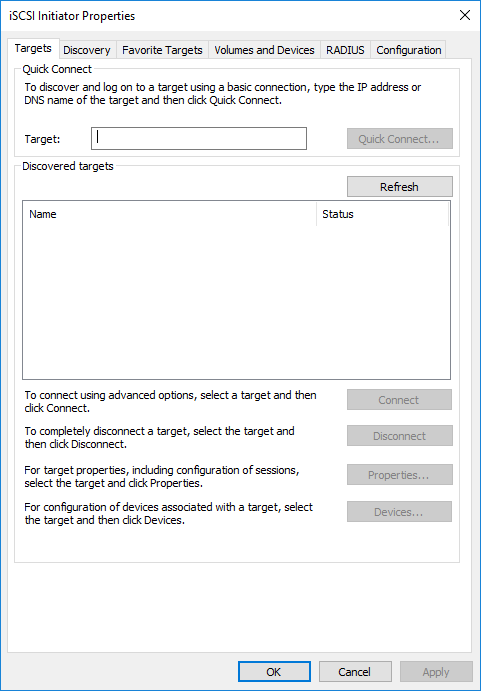
Cum poti deschide ISCSI Initiator din CMD Data 07/04/2019 Autor alexandru corches Categorie Soluții -8 807 Configurare noua (How To) Situatie Solutie Pasi de urmat Accesam start menu si deschidem cmd. In cmd introducem urmatoarea comanda: control /name Microsoft.iscsiinitiator -Exemplu Dupa introducerea liniei de comanda observam ca ISCSI Initiator s-a deschis. Tip solutiePermanent Voteaza Up Down (15 din 38 persoane apreciaza acest articol) ShareTweetShare Despre Autor alexandru corches Solutii Asemanatoare Windows 11 – previzualizarea fișierelor PDF nu funcționează în File Explorer 0 How to reset a Googlebook to factory settings 4 Tint App Icons to match your New iPhone 18 Pro Color 1 How to verify Windows 11 ISO file authenticity using PowerShell 1 Rezolvarea situatiei cand un laptop se blocheaza -5 Configurare gmail 0 Leave A Comment? × Cancel Reply Save my name, email, and website in this browser for the next time I comment. 9 × five =
Leave A Comment?
