
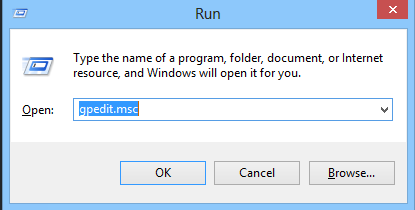
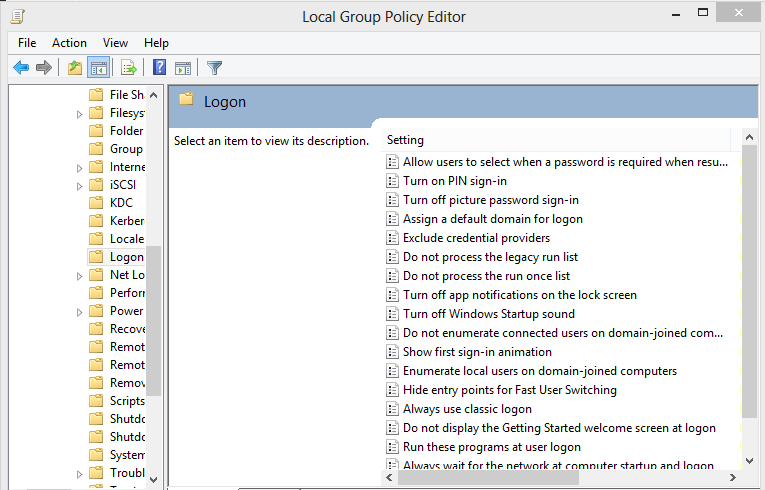
Dezactivarea Picture Password pe Windows 8 Data 13/07/2016 Autor Cristian V Categorie OS - Windows -15 1810 Configurare noua (How To) SituatieWindows 8 are un feature denumit Picture Password, care permite logarea prin executarea anumitor operatiuni intr-o poza. Dorim sa dezactivam acest feature. Solutie Pasi de urmat Apasam WIN+R si scriem gpedit.msc Navigam Computer ConfigurationAdministrative TemplatesSystemLogon Dam dublu click pe Turn off picture password sign-in si il setam ca Enabled Tip solutiePermanent Etichetare: askitaskit.roConfigurationAdministrativeDezactivarea Picture PasswordDezactivarea Picture Password pe Windows 8gpedit.mscPicture PasswordWindows 8 Voteaza Up Down (22 din 59 persoane apreciaza acest articol) ShareTweetShare Despre Autor Cristian V Solutii Asemanatoare Windows has built-in repair tools that work better than any paid optimizer 3 Cum remediem erorile: WHEA_UNCORRECTABLE_ERROR, CRITICAL_PROCESS_DIED in Windows Server 2 Delayed mesaj de eroare când încercați să accesați un folder partajat care nu mai există în Windows 1 Funcția UNIQUE nu funcționează în Excel 4 Outlook nu funcționează cu VPN pe PC Windows 2 Bara de volum in Windows 11 apare incontinuu 5 Leave A Comment? × Cancel Reply Save my name, email, and website in this browser for the next time I comment. one + two =
Leave A Comment?