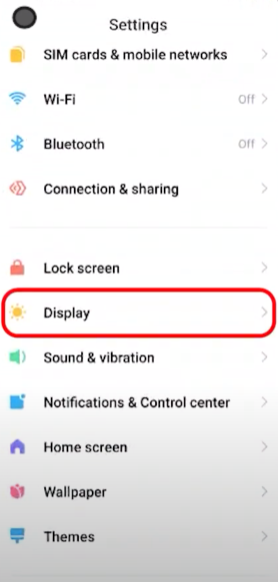
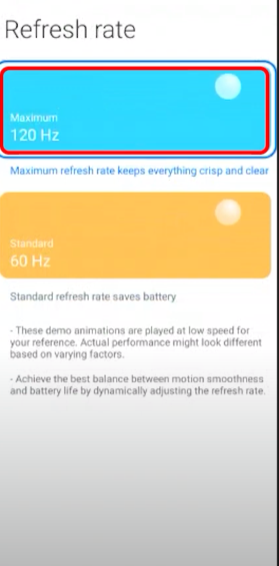
How to change refresh rate on Xiaomi Poco X3 Pro Data 20/02/2023 Autor stefan cirstea Categorie Mobile, Soluții 10 618 Configurare noua (How To) Situatie Solutie 1. Go to phone Settings and tap on Display. 2. From Display tap on Refresh Rate. 3. From Refresh Rate set it to 120Hz. Tip solutiePermanent Voteaza Up Down (39 din 68 persoane apreciaza acest articol) ShareTweetShare Despre Autor stefan cirstea Solutii Asemanatoare Cum se instaleaza Zsh pe Debian 11, 12, 13? 1 Cum se instaleaza Metasploit pe Debian 11, 12, 13? 0 Cum se instaleaza Python 3.14 pe Debian 11, 12 ,13? 0 Change page zoom level in Google Chrome 3 Shortcut reload the current page in Google Chrome 0 Reset page zoom level in Google Chrome 0 Leave A Comment? × Cancel Reply Save my name, email, and website in this browser for the next time I comment. eight − = zero


Leave A Comment?