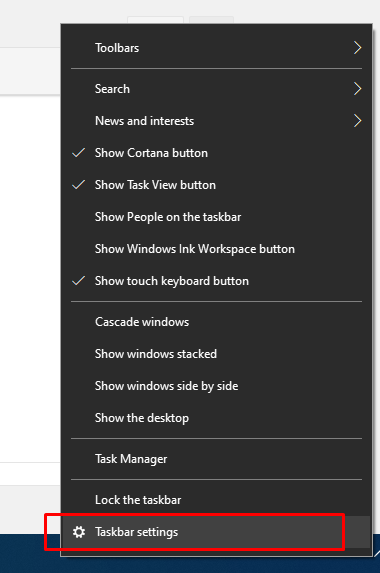
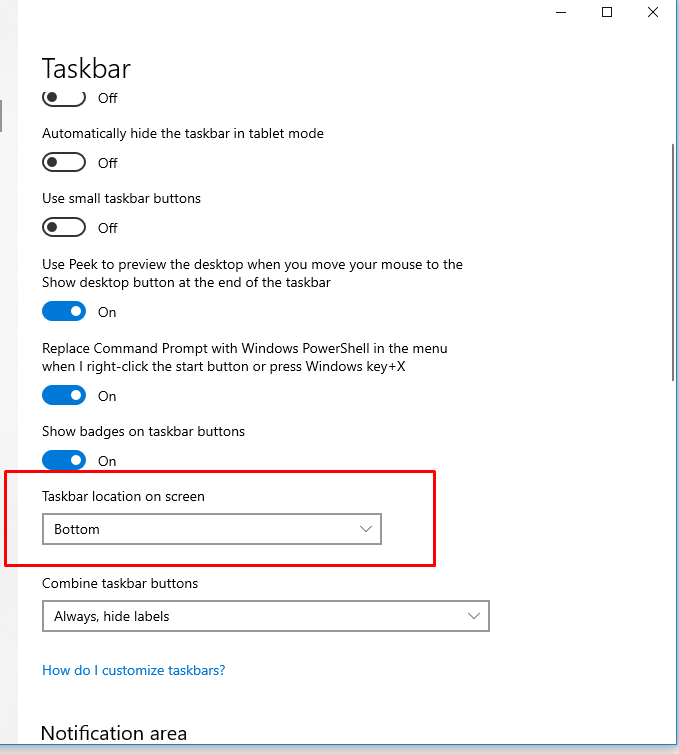
How to change the loction of the taskbar on the screen Data 13/09/2021 Autor tudorache mihai Categorie OS - Windows, Soluții -1 571 Configurare noua (How To) Situatie Solutie Pasi de urmat Click a blank portion of the taskbar And taskbar loction to change the position of the taskbar It can be on top of the screen, right or left, bottom is the default. Tip solutiePermanent Voteaza Up Down (23 din 47 persoane apreciaza acest articol) ShareTweetShare Despre Autor tudorache mihai Solutii Asemanatoare Rezolvarea situatiei cand un laptop se blocheaza 0 Configurare gmail 0 Diagnosticare Hardware: Erori de Boot la Fujitsu ESPRIMO E720 0 3 annoying Windows apps you can replace with an Excel spreadsheet 4 3 Linux commands you’ve overlooked for too long -1 Utilizarea comenzii timeout in Linux -4 Leave A Comment? × Cancel Reply Save my name, email, and website in this browser for the next time I comment. seven − three =
Leave A Comment?