
Situatie
To resolve the Task Manager processes bug on Windows 11, follow these steps:
Backup
2. Download the ViveTool-vx.x.x.zip file on your computer
3. Double-click the zip folder to open it with File Explorer
4. Click the Extract all button
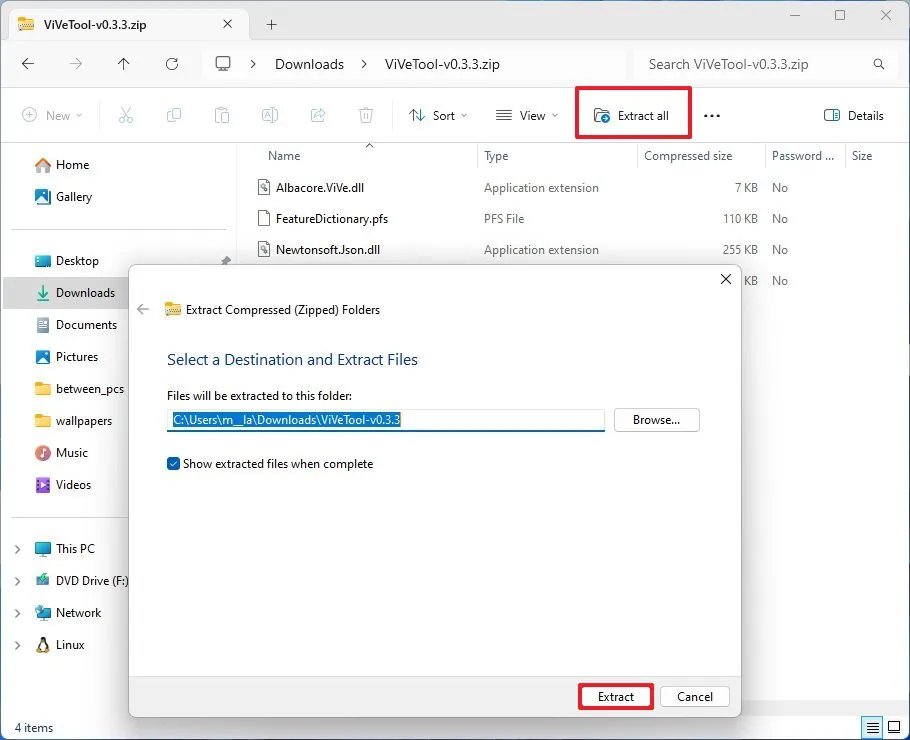
5. Click the Extract button
6. Copy the path to the folder
7. Open Start
8. Search for Command Prompt, right-click the top result, and select the Run as administrator option
9. Type the following command to navigate to the ViveTool folder and press Enter:
cd c:\folder\path\ViveTool-v0.x.x
In the command, remember to change the path to the folder with your path.
10. Type this command to fix the Task Manager running in the background after closing and press Enter:
vivetool /enable /id:49407484,57048231
11. Restart the computer.
Once you complete the steps, the Task Manager should no longer continue to run in the background after it’s closed.
Leave A Comment?