
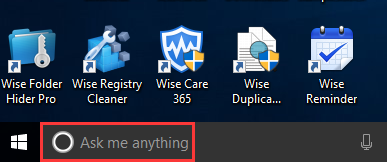
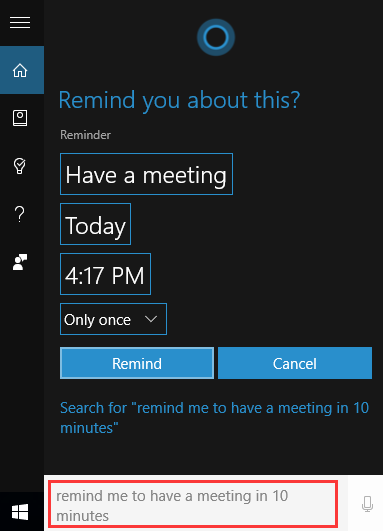
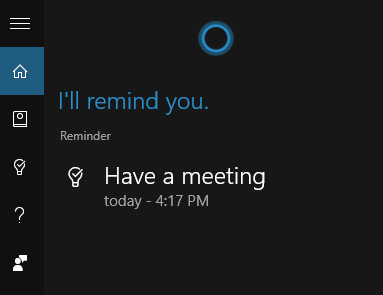
How to Set a Reminder in Windows 10 Data 03/07/2021 Autor Tiberiu Gache Categorie OS - Windows -7 489 Configurare noua (How To) Situatie Solutie Pasi de urmat Activate Cortana or select “Ask me anything” Now you can tell Cortana to remind you at a certain time, such as “remind me to have a meeting in 10 minutes” It can remind you only once, in every day, or on specific days of the week. Now from here, you can find that the reminder has been set successfully. Tip solutiePermanent Etichetare: How to Set a Reminder in Windows 10 Voteaza Up Down (13 din 33 persoane apreciaza acest articol) ShareTweetShare Despre Autor Tiberiu Gache Solutii Asemanatoare How to fix high CPU usage in Firefox / Chrome 2 How to fix Hypervisor Error in Windows 10/11 by Checking Drive for File System Errors 6 How to fix Hypervisor Error in Windows 10/11 by restarting Hyper-V Services 1 How to fix Hypervisor Error in Windows 10/11 by running Windows Memory Diagnostic Tool -1 How to fix Hypervisor Error in Windows 10/11 by enabling Hyper-V or Windows Hypervisor Platform via Windows Features 1 These hidden Windows repair tricks fix corrupted files 2 Leave A Comment? × Cancel Reply Save my name, email, and website in this browser for the next time I comment. seven − = 3
Leave A Comment?