
Situatie
To prevent Microsoft Edge from downloading AI models on Windows 11 using the Registry, follow these steps:
Solutie
1. Open Start on Windows 11
2. Search for regedit and click the top result to open the Registry
3. Open the following path:
HKEY_LOCAL_MACHINE\SOFTWARE\Policies\Microsoft
4. Right-click the Microsoft key, select New, and choose Key
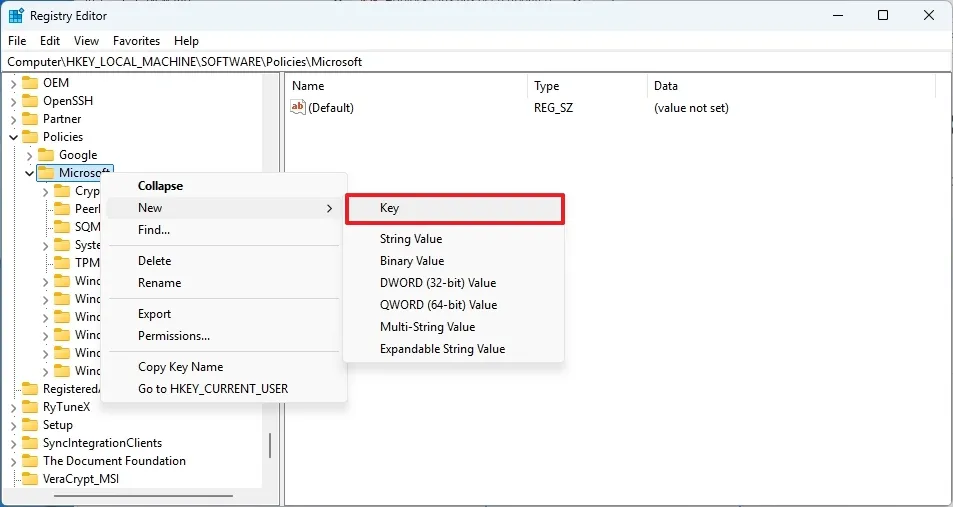
5. Confirm the Edge name and press Enter
6. Right-click the Edge (folder) key, select the New submenu, and choose the “DWORD (32-bit) Value” option
7. Confirm the GenAILocalFoundationalModelSettings name and press Enter
8. Right-click the newly created key and select Modify.
9. Set the value to 1 to prevent Microsoft Edge from downloading and using locally available AI models on your device.
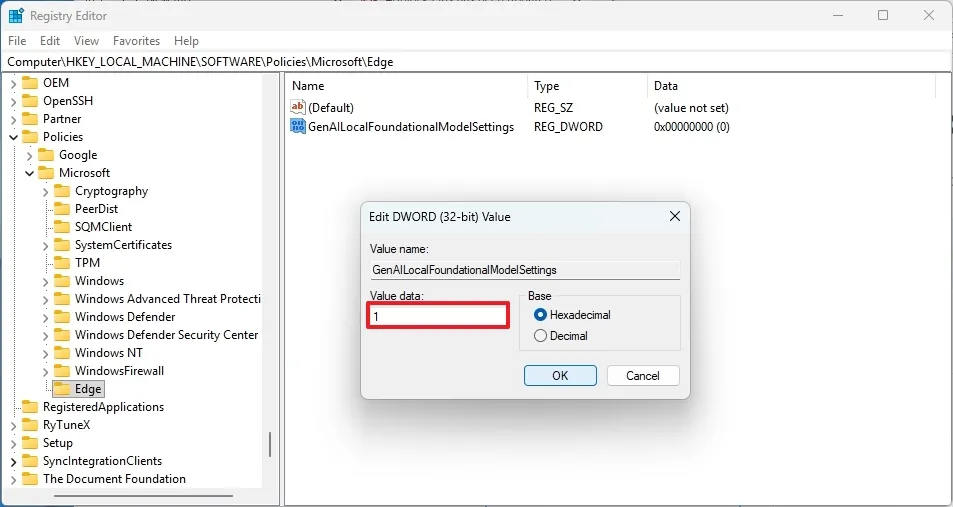
10. Click the OK button.
11. Restart your computer.
Leave A Comment?