
Follow Us

Soluții pentru problemele tale IT

Home /Stații de lucru/OS - Windows/Problema logare utilizator in Windows (Vista/7/8/10) pe statie de lucru
Home /Stații de lucru /Problema logare utilizator in Windows (Vista/7/8/10) pe statie de lucru
Home /OS - Windows/Configurare Sistem de operare/Problema logare utilizator in Windows (Vista/7/8/10) pe statie de lucru
Home /OS - Windows/Depanare/Problema logare utilizator in Windows (Vista/7/8/10) pe statie de lucru

Problema logare utilizator in Windows (Vista/7/8/10) pe statie de lucru

  • Data 05/04/2018
  • Autor Gherghe Robert Petre
  • Categorie Configurare Sistem de operare, Depanare, OS - Windows, Stații de lucru
  • -3
  • 1277
Rezolvare problema (Fix IT)

Situatie

In momentul in care se incearca logarea pe un anumit utilizator, apare una dintre erorile de mai jos:

  • “The User Profile Service failed the logon. User profile cannot be loaded.”
  • “We can’t sign into your account”
  • “The user profile is damaged. Cannot logon”

Solutie

Cel mai simplu mod de a rezolva problema incepe prin logarea pe un alt cont care are drepturi de administrator. Aceasta se poate face din Safe Mode sau Safe Mode with Networking.

Pentru a intra in Safe Mode se va apasa tasta F8, repetat, la repornirea calculatorului si se va selecta Safe Mode sau Safe Mode with Networking.

Odata logat pe un cont de administrator, se va crea un nou cont si se vor copia setarile contulul vechi pe noul cont creat. Aceasta se poate face urmand pasii de mai jos:In Windows 8 de pe Desktop, apasa tasta Win+c si selecteaza Settings si apoi Control Panel. 
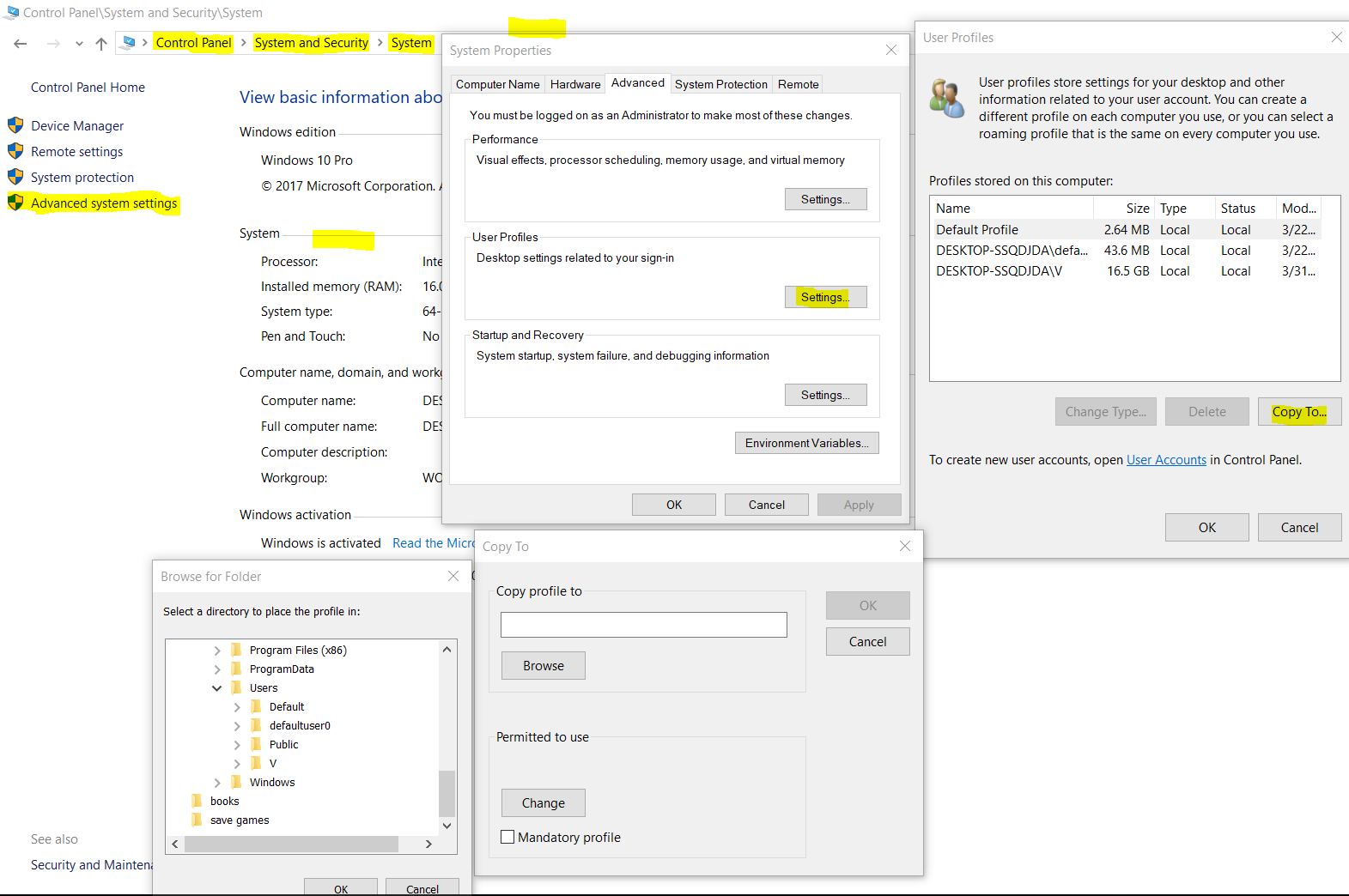
In Windows 10 de pe Desktop, se apasa tasta Win, se scrie Control Panel si se apasa Enter. 

In Windows 7 si Vista, din meniul Start, selecteaza Control Panel.

  1. Selecteaza Category view si apoi System and Security ->System.
  2. Selecteaza Advanced System Settings.
  3. Sub categoria “User Profiles”, selecteaza Settings.
  4. Selecteaza profilul pe care vrei sa il copiezi.
  5. Apasa Copy to, apoi introduce numele profilului sau selecteaza calea catrea profilul care va fi ..rescris. Aceasta este de obicei  <<C:Usersnume_user>>, unde <<nume_user>> este numele profilului pe care il vei rescrie.


Se restarteaza calculatorul si se va putea loga pe noul profil de utilizator si toate setarile vechi vor fi prezente.

Tip solutie

Permanent
Etichetare: askitaskit.roCopy toProblema logare utilizator in Windows (Vista/7/8/10) pe statie de lucrusafe modeSafe Mode with Networkingsecuritysettingsstatie de lucruSystemtasta F8User profile cannot be loadedUser ProfilesVista/7/8/10Win+cwindowswindows 7Windows 8

Voteaza

Up Down
(33 din 69 persoane apreciaza acest articol)
Share
Tweet
Share

Despre Autor

Gherghe Robert Petre

Solutii Asemanatoare

  • Arduino Weather Station guide 2
  • Arduino Distance Sensor with OLED Display 0
  • Remediere: Apple CarPlay not working 3
  • Rezolvare: Face ID not working on iPhone 4
  • Rezolvare: Microsoft Intune not working or opening 3
  • How to fix Task Manager duplicate process bug on Windows 11 using ViveTool 0

Leave A Comment? × Cancel Reply

30597

Soluții Disponibile

0 Articole

In ultima saptamana

Cele mai recente soluții

  • Enable Archivelog Mode in RAC
    • 7
    • 13 hours ago
  • Oracle: Enable/Disable Flashback Database
    • 7
    • 10/11/2025
  • Arduino Weather Station guide
    • 9
    • 1 day ago
  • Arduino Distance Sensor with OLED Display
    • 8
    • 09/11/2025
  • Cum activezi funcția „use Opera translate” în Opera GX
    • 8
    • 4 days ago
© Askit.ro, 2014 - 2025. All rights reserved. Done by Class IT
Share
Tweet
Share