
Situatie
Solutie
If you often conduct the same searches to find specific data across folders or drives, it can be both frustrating and time-consuming. To save time and avoid repeatedly redefining your search criteria, consider saving your search criteria to Quick Access. This allows you to easily locate your data without the hassle of starting the search from scratch each time.
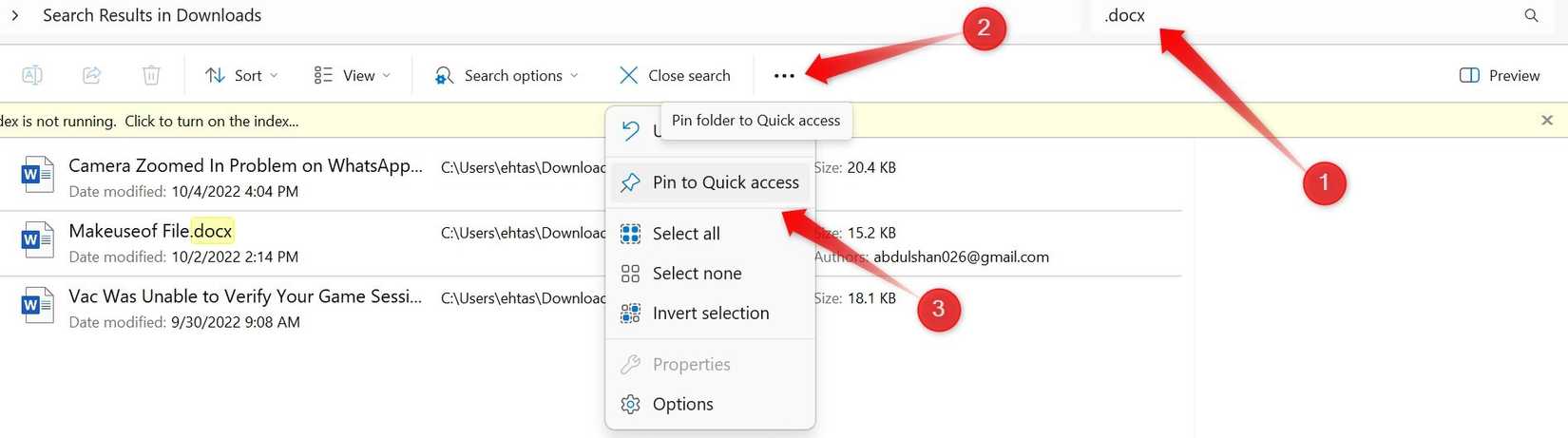
To save a search, enter your desired keywords in the File Explorer search bar and apply filters. Once the results appear, click the three horizontal dots on the right side of the ribbon and choose “Pin to Quick Access”.
The next time you need to perform the search, go to Quick Access, click on the saved search, and Windows will quickly find the files matching the criteria.
Leave A Comment?