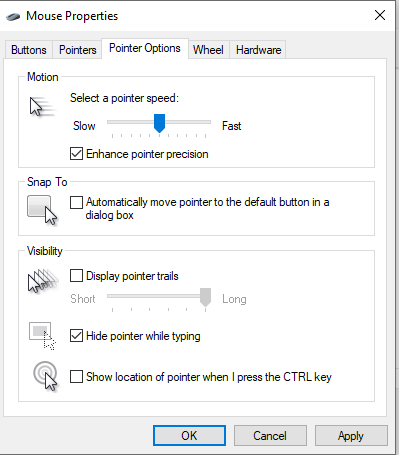
Dezactivare Mouse pointer Precision (Windows 10) Data 04/08/2020 Autor Gabriel Nitu Categorie Optimizare PC, Optimizare PC, OS - Windows, Stații de lucru -9 853 Configurare noua (How To) SituatieDorim sa dezactivam Mouse pointer precision. Solutie Deschidem Control Panel mergem pe mouse. Dupa care mergem pe tab-ul “Pointer Options” si debifam enhance pointer precision. Dupa care dam apply si ok. Tip solutiePermanent Voteaza Up Down (28 din 65 persoane apreciaza acest articol) ShareTweetShare Despre Autor Gabriel Nitu Solutii Asemanatoare Cum instalati Tiger pe Ubuntu 24.04? 1 Instalare și utilizare Lynis pentru audituri de securitate pe Linux 4 Instalare și utilizare Rootkit Hunter(rkhunter) pe Ubuntu 24.04 sau 22.04 4 How to boot Windows 11 in Safe Mode using Command Prompt 2 How to backup BitLocker recovery key on Windows 11 4 How to use Rufus to create a bootable media of Windows 11 that disables encryption 2 Leave A Comment? × Cancel Reply Save my name, email, and website in this browser for the next time I comment. five − four =

Leave A Comment?