
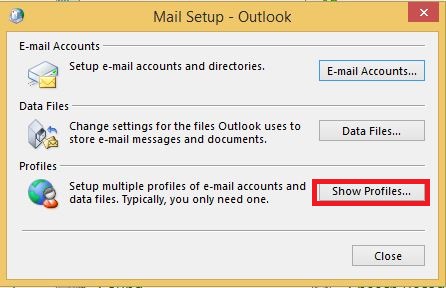
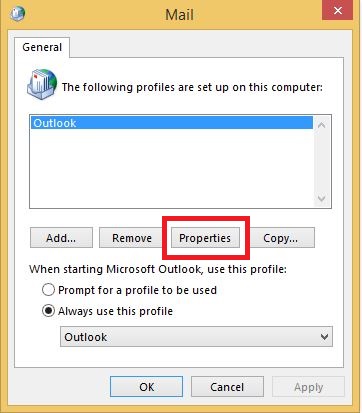
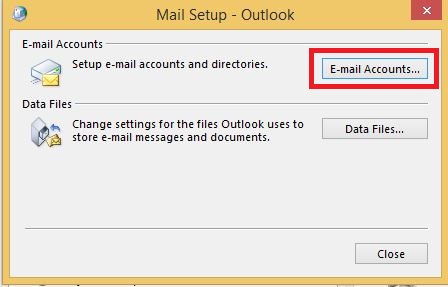
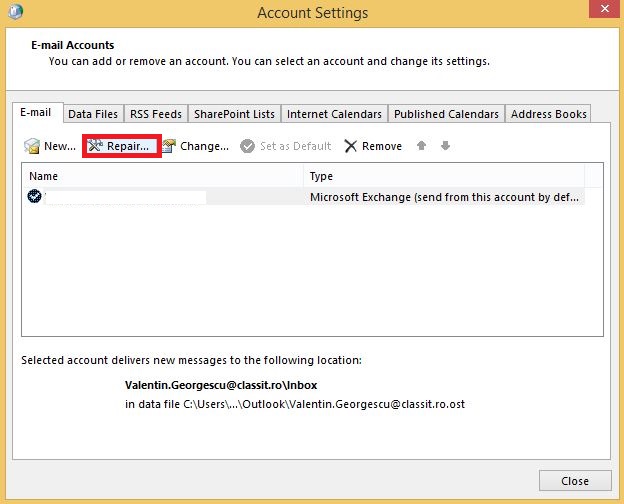
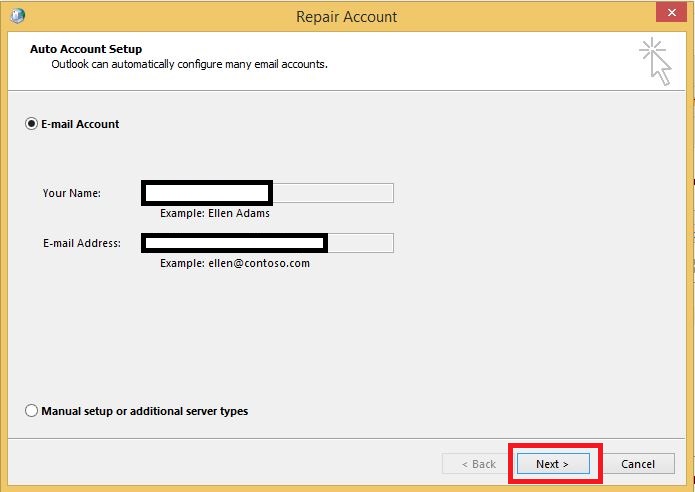
Cum sa dai repair la profilul de email in Outlook. Data 14/05/2015 Autor Valentin G Categorie E-mail, Recuperare (arhive, fisiere pst/ost), Aplicații, Depanare -18 2504 Configurare noua (How To) SituatieCum sa dai repair la profilul de email in Outlook. Solutie Pasi de urmat Se intra in Control Panel si se acceseaza “Mail”. Se da click pe “Show Profiles”. Se selecteaza profilul dorit si se da click pe “Properties”. Se da click pe “E-mail Accounts..”. Se selecteaza contul de email dorit pentru repair si se da click pe “Repair” din tab-ul de sus. Se da click pe “Next” si se asteapta terminarea repair-ului. Tip solutiePermanent Voteaza Up Down (28 din 74 persoane apreciaza acest articol) ShareTweetShare Despre Autor Valentin G Solutii Asemanatoare Cum rezolvam problema timpului din Windows cand apar decalaje de ora 5 Cum ascunzi programele instalate din lista de dezinstalare in Windows 2 4 Excel tools you won’t find on the ribbon 4 How to use claude to build automations in Excel 7 Task Manager won’t tell you what’s eating your RAM, but this free app will 4 Cum construiești un site WordPress gratuit 4 Leave A Comment? × Cancel Reply Save my name, email, and website in this browser for the next time I comment. 9 × eight =
Leave A Comment?